Flashforge AD5X IFS Research Pack
Selector Mapping Dossier
This document is no longer just a profile extraction dump. It is the active engineering record for isolating the exact AD5X IFS rule path that Flashforge-Orca 1.6.2 uses, proving where vanilla Orca diverges, and narrowing the remaining work to selector reconstruction and launcher-boundary reverse engineering.
AD5X
IFS / multi filament
Orca 1.6.2 comparison
truth file acquired
toolchange selector gap isolated
launcher boundary found
runtime hook still viable
handoff ready
Project Status: Paused / abandoned for now
Estimated completion of selector-mapping phase: 72%
The diagnosis, comparison corpus, patch shape, truth-file validation, launcher handoff, DLL entry, and semantic config anchors are all in place. The unfinished part is the exact runtime selector and its final translation into a validated DLL-hook or export-time replacement.
Research Snapshot
Confirmed
Flashforge-Orca emits AD5X toolchange unload, load, ramming, cooling, and pressure-advance resets that vanilla Orca 1.6.2 does not emit from the same project.
Rejected
Profile-only injection, including the real roaming system store in the Windows prefix, did not recreate the Flashforge swap body.
Current Path
The remaining credible target is compiled behavior: selector reconstruction, launcher-to-DLL tracing, export-time hook, or internal toolchange builder rather than another round of JSON-only edits.
Profile JSONs visible and portable
Compiled AD5X swap generator
G-code pair regression set
Likely DLL/export hook target
Executive State Board
The project has moved out of discovery mode. The core Flashforge block family is already known, the real truth file exists, and the new binary work says the first executable is likely only a launcher. The remaining effort is now precise: find or emulate the selector that picks the right concrete swap block at each toolchange.
What Is Settled
Flashforge-Orca emits extra unload, load, ramming, cooling park, and pressure-advance-reset steps for AD5X multi-material swaps. Vanilla Orca does not natively emit those phases, even when it carries the right AD5X identity.
What Is Narrowed
The patcher already reproduces the Flashforge shape. What it still misses is block instance choice: exact ordering, tower-anchor context, and why one truth load/wipe is absent where the synthetic result still emits one.
What Binary Triage Changed
orca-flashforge.exe now looks like a bootstrapper that resolves a DLL and hands execution off through a named entrypoint. That shifts the main reverse-engineering target downstream from the launcher into the loaded slicer module.
Final Handoff State
This report is now being treated as a handoff document rather than an active sprint log. The project is paused before the final selector-mapping and DLL-hook implementation stage. That is important because the work already done is materially useful: the remaining gap is narrow, but it is still real.
What A Successor Does Not Need To Redo
They do not need to re-prove that Flashforge emits richer AD5X swap bodies, re-prove that profile-only injection fails, or re-collect the core truth-file comparisons. Those parts are settled and preserved here.
What A Successor Still Must Solve
They still need the exact selector rule: which real Flashforge block instance is chosen at each swap, and whether that decision depends on transition class, tower anchor, sequence phase, printer/material gates, or another runtime state carrier.
What Would Still Be Premature
Shipping a DLL injection or Lua/template replacement today would still be premature because the rule is not exact yet. The structural patch is close enough for experiments, not close enough to call solved.
Recommended Resume Point
- Resume from the semantic owner functions, not the launcher and not the STL/runtime helper branches.
- Treat the string-owning regions for
custom_gcode_toolchange.json, current_printer_name, invalid filament_id, and allow_multi_materials_on_same_plate as the highest-value anchors.
- Keep the real Flashforge truth file as the acceptance target for every selector change.
Why The Project Was Paused
The stop condition is external, not technical. The original owner decided against buying the Flashforge AD5X and is switching to a higher-temperature platform capable of reaching roughly 350C for engineering materials. That means this document should be read as a transferable engineering asset, not as a dead-end notebook. The work is paused because the printer choice changed, not because the analysis collapsed.
Successor Brief
- The main reverse-engineering question is already reduced from “does Flashforge add anything?” to “what exact selector chooses block variant A versus B at each swap point?”
- The patcher and truth-file corpus are already good enough to regression-test that selector once somebody resumes.
- The best continuation path is semantic function ownership inside
Orca-Flashforge.dll, not more startup boilerplate tracing.
113
extracted files in this pack
5
AD5X machine/nozzle profile files
74
AD5X-specific filament profile files
Research Pack Overview
The working pack for this project is flashforge_ad5x_research_pack.
It is organized as a clean staging area for extracted profiles, comparison files, binary clues, and patching work.
Treat this pack as a categorized research bundle for porting and testing, rather than as an installed Orca or Cura package.
Best Method Right Now
The practical path is now split into two layers. The outer layer is still a vanilla-Orca-compatible integration route, likely an internal patch, runtime hook, or export-time intervention. The inner layer is selector mapping: the remaining work is to choose the exact right Flashforge-style block instance at each swap, not to prove again that the block family exists.
1. Orca profile/resource pack + AD5X toolchange validation
2. Selector reconstruction against the real Flashforge truth file
3. Follow launcher -> DLL boundary to find the compiled rule path
4. Runtime hook or internal patch only after selector quality is validated
Key Files And Folders
These are the concrete files and directories used in the current AD5X reverse-engineering pass. This section is here so the research page is operational, not just descriptive.
Website-Ready Image Bundle
Single sibling folder now containing every image currently used by this HTML. This is the image set to carry forward into the website version.
site_assets
Research README
Short pack overview for orientation before opening the larger HTML.
README.md
IDA Loader Evidence Assets
Cropped screenshots and binary-handoff evidence used by the launcher-triage section of this document.
ida_loader_steps
Toolchange Patcher
Current script used to inject Flashforge-style toolchange bodies into vanilla Orca output for comparison work.
patch_toolchanges.py
Flashforge Comparison Install
Reference Flashforge-Orca tree used for profile and binary comparison.
Orca-Flashforge
Official Orca Windows Prefix
Vanilla Orca 1.6.2 Windows install used for the in-app profile injection test.
orcawindows1.6.2
Live Roaming System Profiles
The actual OrcaSlicer roaming profile store that was patched with Flashforge vendor files.
Flashforge
Patched Test Sources
3MF sources used to force same-model comparisons across Flashforge-Orca and vanilla Orca.
ifs_compare_test_sources
Temp G-code Comparison Set
Same-cube outputs, patched variants, and current regression references.
temp
Main Vanilla Binary Path
Original vanilla Orca program files folder used when checking whether edits were landing in the real install.
OrcaSlicer
Active Comparison Files
These are the concrete test artifacts behind the current conclusions. If someone needs to repeat the same comparison, these are the first files to open.
Live-System Re-slice
The output produced after injecting Flashforge profiles into the live Orca roaming system store.
tempOrcaCube_AD5X_3h29m.gcode
Flashforge 4-Tool G-code
The current four-filament Flashforge reference used to stress-test the same conclusion on a larger plate.
flashforge4nozzleprint.gcode
Vanilla 4-Tool G-code
The corresponding vanilla Orca output generated from the AD5X-patched multi-object project.
vanilla4nozzleprint.gcode
Visual Model Of The Problem
Four filament sources feed one nozzle. The slicer must know which color/material is active, when to switch tools, and where to purge old filament.
That is why the prime/wipe tower and tool-change planning must happen during slicing, not as a blind afterthought.
Evidence Architecture
What The Side-By-Side Comparison Actually Proves
Profiles
AD5X printer, nozzle, filament, and process metadata can be moved around enough for vanilla Orca to identify the printer family and emit AD5X-labeled Klipper output.
Not Enough
The presence of correct printer names, tool IDs, prime tower settings, and Klipper flavor still does not mean the swap logic is correct. The emitted toolchange body is the real compatibility barrier.
Compiled Layer
The missing unload/load/ramming/cooling sequence strongly suggests Flashforge-Orca has extra compiled behavior on the single-extruder multi-material path that vanilla Orca does not have.
Operational Consequence
A printer purchase decision should not assume that “AD5X appears in Orca” equals safe IFS support. The emitted G-code body has to match.
Reverse-Engineering Sequence
1
Extract profiles and assets
Separate JSON resources, inherited machine files, assets, and binary clues from Flashforge-Orca.
2
Build matched test projects
Create patched 3MFs so both slicers can slice the same object with the same nominal AD5X setup.
3
Compare real G-code bodies
Ignore the marketing layer. Count toolchanges, compare ramming/cooling/load/unload lines, and diff the actual swap blocks.
4
Locate compiled rule path
Use binary strings and Ghidra/xrefs to find where Flashforge-Orca emits the AD5X single-nozzle swap sequence.
5
Mirror it in vanilla Orca
Likely through a DLL/export hook or internal patch, not another round of profile-only edits.
Orca 2.3 Resource Pack
Best first attempt because Flashforge-Orca is already an Orca fork and the extracted files are Orca-style JSON profiles.
lowest translation work
keeps prime tower logic
best fit
- Copy profile resources into a test Orca 2.3 profile area.
- Confirm AD5X appears as a selectable printer.
- Slice a tiny two-color model and inspect G-code before printing.
Cura Profile / Plugin
Possible, but it requires translating Orca profile concepts into Cura definitions and validating multi-material output.
medium risk
format rewrite
Python/resources
- Cura cannot read these Orca JSON files directly.
- Definitions, extruders, materials, and quality profiles must be built separately.
Post-Slice Patcher
Useful only if the slicer already outputs sane multi-material structure. It can tune or repair, but it should not invent IFS behavior from a single-color file.
high risk
patch only
not first choice
- Good for temperatures, comments, metadata, and small G-code corrections.
- Bad for creating purge towers and color planning after slicing.
DLL Drop-In
Not the correct Cura mechanism. Cura plugins are not normally arbitrary DLLs copied beside the app.
wrong interface
binary risk
avoid
- Ghidra may help understand behavior, not produce a safe Cura plugin directly.
- Compiled Flashforge logic may not be portable into Cura.
Decision Scorecard
Scores are pragmatic fit for AD5X/IFS support, not general slicer quality.
Orca 2.3 profiles
Best fit
Cura plugin/profile
Possible
Main Finding
Flashforge-Orca contains real AD5X support as Orca-style JSON profiles. Official Orca 1.6.2 Windows does not include a Flashforge profile root.
The visible IFS behavior starts with machine, filament, process, prime tower, and tool-selection settings, but the latest same-model G-code comparison found a second requirement:
Flashforge-Orca generates additional toolchange code that vanilla Orca 1.6.2 does not generate from the same patched project.
AD5X machine profile:
single_extruder_multi_material = 1
gcode_flavor = klipper
machine_start_gcode ends with T[initial_no_support_extruder]

AD5X process profiles:
enable_prime_tower = 1
prime_volume = 15..100 depending on nozzle/profile
skirt_loops = 0
support_type = tree(auto)
Cura Warning
Cura cannot use these Orca JSON profiles directly. A Cura solution would need translated machine definitions, quality profiles, extruder/material definitions,
and likely a post-processing layer if Cura cannot emit the AD5X-compatible tool selection and purge behavior.
A random DLL is not the normal Cura plugin mechanism. Cura plugins are usually Python packages and resource definition files.
Latest Same-Cube G-code Result
We patched flashforge_162_OrcaCube_v2_AD5X_patched.3mf so both Flashforge-Orca 1.6.2 and vanilla OrcaSlicer 1.6.2 could slice the same two-part cube as AD5X/Klipper multi-material output.
Both outputs now use the same visible AD5X profile and matching tool IDs, but the actual toolchange bodies are different.
Matched
Both files identify as Flashforge AD5X 0.4 nozzle, gcode_flavor = klipper, enable_prime_tower = 1, single_extruder_multi_material = 1, and flush_multiplier = 0.3.
Tool IDs Matched
After correcting slot selection, both outputs used T0 and T2. No M620 or M621 commands appeared in either file.
Not Matched
Flashforge-Orca emits unload/load/ramming/cooling code inside each toolchange. Vanilla Orca emits a much simpler tool switch plus wipe sequence. This is the likely reason a vanilla Orca AD5X file may fail on real IFS hardware.
Flashforge-Orca Reference
temp/flashforge_orca_cube_t1_t3.gcode
generated by Orca-Flashforge 1.6.2
T0 = 26
T2 = 27
CP TOOLCHANGE START = 51
CP TOOLCHANGE UNLOAD = 52
CP TOOLCHANGE LOAD = 52
CP TOOLCHANGE WIPE = 52
Ramming start = 52
Cooling park = 52
SET_PRESSURE_ADVANCE ADVANCE=0 = 52
G1 E-55.3000 = 52
G1 E18.0000 = 52
Vanilla Orca Output
temp/vanilla_orca_cube_t1_t3.gcode
generated by OrcaSlicer 1.6.2
T0 = 27
T2 = 25
CP TOOLCHANGE START = 50
CP TOOLCHANGE UNLOAD = 0
CP TOOLCHANGE LOAD = 0
Ramming start = 0
Cooling park = 0
SET_PRESSURE_ADVANCE ADVANCE=0 = 0
G1 E-55.3000 = 0
G1 E18.0000 = 0
Flashforge Toolchange Shape
; CP TOOLCHANGE START
; CP TOOLCHANGE UNLOAD
SET_PRESSURE_ADVANCE ADVANCE=0
; Ramming start
G1 E-15.0000 F6000
G1 E-55.3000 F5400
G1 E-15.8000 F2700
G1 E-7.9000 F1620
M104 S200
; Cooling
; Cooling park
; Ramming end
T0 / T2
; CP TOOLCHANGE LOAD
G1 E18.0000 F180
; CP TOOLCHANGE WIPE
Vanilla Toolchange Shape
; CP TOOLCHANGE START
M220 S100
T0 / T2
G4 S0
; CP TOOLCHANGE WIPE
; CP TOOLCHANGE END
Current conclusion: the AD5X/IFS port is not just "make Orca show AD5X." The output must preserve Flashforge-style ramming, unload, load, and cooling behavior around tool changes. That behavior is now the main target for the next extraction/porting pass.
Forensic Comparison Board
This board reduces the current finding to its operational core. Both slicers can be made to say “AD5X”, but only one emits the full swap sequence needed for a believable IFS workflow.
Flashforge-Orca Path
- AD5X profile recognized
- Prime tower enabled
CP TOOLCHANGE UNLOADRamming startCooling parkCP TOOLCHANGE LOADSET_PRESSURE_ADVANCE ADVANCE=0
Vanilla Orca Path
- AD5X profile recognized
- Prime tower enabled
CP TOOLCHANGE STARTTn swapCP TOOLCHANGE WIPE- No unload/load body
- No ramming/cooling section
Profile Layer
Machine, filament, and process JSON provide identity and defaults.
Compiled Rule Path
Likely source of AD5X swap generation that profile injection did not reproduce.
Regression Inputs
Patched 3MF sources and same-model G-code pairs constrain the comparison.
Hook Target
Export buffer or internal toolchange builder inside vanilla Orca.
AD5X
IFS logic
Four-Tool Stress Test
We repeated the comparison on a larger four-object, four-tool plate using the AD5X-patched vanilla project and a Flashforge-Orca export. This test is noisier than the same-cube comparison because tower placement was manually moved during one pass and then corrected later, so it should be treated as supporting evidence, not the cleanest reference pair.
Strong Signal
Even on the larger plate, Flashforge-Orca still emits the full AD5X swap routine and vanilla Orca still does not. The missing sections remained stable: unload, load, ramming, cooling park, and pressure-advance reset.
Layout Noise
The prime/wipe tower is part of the actual swap system. Moving it changes the coordinates used by the toolchange routine, so any manual tower movement adds comparison noise. That is why this 4-tool pair is useful but not as clean as the same-cube pair.
Still Not Matched
Flashforge had 403 toolchange starts and 406 unload/load/ramming/cooling markers. Vanilla had 401 toolchange starts and 0 of those deeper AD5X swap markers.
Flashforge 4-Tool Reference
temp/flashforge4nozzleprint.gcode
generated by Orca-Flashforge 1.6.2
total filament change = 402
tool counts = T0:151 T1:127 T2:76 T3:52
CP TOOLCHANGE START = 403
CP TOOLCHANGE UNLOAD = 406
CP TOOLCHANGE LOAD = 406
Ramming start = 406
Cooling park = 406
SET_PRESSURE_ADVANCE ADVANCE=0 = 406
Vanilla 4-Tool Output
temp/vanilla4nozzleprint.gcode
generated by OrcaSlicer 1.6.2
printer_model = Flashforge AD5X
printer_settings_id = Flashforge AD5X 0.4 nozzle
tool counts = T0:151 T1:125 T2:76 T3:50
CP TOOLCHANGE START = 401
CP TOOLCHANGE UNLOAD = 0
CP TOOLCHANGE LOAD = 0
Ramming start = 0
Cooling park = 0
SET_PRESSURE_ADVANCE ADVANCE=0 = 0
Representative 4-Tool Block Difference
Flashforge first block:
START -> WIPE_TOWER_START -> UNLOAD -> ramming -> cooling park -> T1 -> LOAD -> WIPE -> G92 E0 -> END

Vanilla first block:
START -> T1 -> WIPE -> G92 E0 -> END
The 4-tool dataset strengthens the same conclusion reached by the cube test. Even when AD5X identity is present in the vanilla header, the real Flashforge IFS behavior is still living in the emitted toolchange body, not just the visible profile metadata.
Model Comparison Ledger
This table is the compact research log. It tracks which comparison was actually clean, what was held constant, what still differed, what interventions were tried, and where human setup choices introduced noise.
| Model / Test |
Files |
What Matched |
What Differed |
What We Tried |
Human / Setup Shortfalls |
| Real Flashforge vs transition-aware v3 patch |
3itemacutall4flashforge.gcode
3itemacutall4vanilla_flashforge_style_patched_v3.gcode
3itemacutall4vanilla.gcode
|
The patch successfully reproduced the broad Flashforge swap shape: same total toolchange starts, same unload markers, same ramming markers, same cooling park markers, and same pressure-advance reset count.
|
It still failed to match exact block order and exact tower-coordinate usage. The first real Flashforge block switched to T3 while the patched file switched to T1. Real Flashforge also had 491 load/wipe markers where the patch had 492.
|
Ran a third-pass transition-aware patcher that chose reference blocks by previous-tool to next-tool transition instead of only by block index or tool identity.
|
No major human setup noise here. This is the strongest comparison because it is against the actual Flashforge truth file for the exact print. The remaining errors are patch-model errors, not operator noise.
|
| Two-filament cube pair |
flashforge2nozzlecubeprint.gcode
vanilla2nozzlecubeprint.gcode
flashforge_162_OrcaCube_v2_AD5X_patched.3mf
|
Vanilla clearly carried AD5X identity, Klipper flavor, prime tower enabled, and the expected AD5X process/profile naming. The pair is simpler and cleaner than the four-tool plate.
|
Flashforge still emitted full unload/load/ramming/cooling/pressure-advance-reset swap blocks while vanilla still emitted only the simple tool switch plus wipe path. Tool counts were close but not identical.
|
Used a simpler two-filament OrcaCube pair specifically to reduce dataset noise and create a better hook-contract reference.
|
Cleaner than the four-tool dataset, but still not perfectly geometry-aligned: Flashforge and vanilla used noticeably different Y-ranges for the first tower-path region, so coordinate alignment is improved but not perfect.
|
| Same-cube AD5X pair |
flashforge_orca_cube_t1_t3.gcode
vanilla_orca_cube_t1_t3.gcode
flashforge_162_OrcaCube_v2_AD5X_patched.3mf
|
Same source project, AD5X/Klipper identity, prime tower enabled, matching visible profile family, matching tool IDs after slot correction.
|
Flashforge emitted unload/load/ramming/cooling/pressure-advance-reset swap blocks. Vanilla emitted only the simple tool switch plus wipe path.
|
Patched the 3MF to AD5X, corrected slot mapping, compared same-model G-code block counts and representative toolchange bodies.
|
Early slot numbering mismatch created avoidable noise until corrected. After correction this became the cleanest comparison pair.
|
| Live roaming-system profile injection |
tempOrcaCube_AD5X_3h29m.gcode
Roaming OrcaSlicer/system/Flashforge
|
Vanilla Orca recognized the AD5X profile family more realistically and produced AD5X-labeled Klipper output.
|
The emitted toolchange body still lacked Flashforge unload/load/ramming/cooling logic. Metadata alignment did not create behavioral alignment.
|
Injected Flashforge vendor profiles and swap-related profile values into the live roaming system store used by the Windows prefix.
|
No major human layout error here. The failure was structural: profile injection alone was not enough.
|
| Patched export-time toolchange test |
tempOrcaCube_AD5X_3h29m_toolchange_patched.gcode
patch_toolchanges.py
|
The patcher successfully inserted the missing Flashforge-style unload/load/ramming/cooling sections into vanilla output for the test case.
|
It was still a derived patch, not proof that vanilla Orca had learned the real AD5X logic internally.
|
Built a post-export toolchange patcher using the Flashforge output as the behavioral template.
|
No human layout problem. The limitation was methodological: this was a patch result, not a native slicer result.
|
| Four-tool stress test |
flashforge4nozzleprint.gcode
vanilla4nozzleprint.gcode
orca162vanilla_AD5X_patched.3mf
|
Both used AD5X/Klipper framing, prime tower behavior, and overlapping tower X-range after correction. The larger test still reproduced the same core mismatch.
|
Flashforge had full swap bodies and higher toolchange counts; vanilla still had zero unload/load/ramming/cooling markers and slightly different tool counts.
|
Patched the multi-object vanilla 3MF to AD5X settings, then exported a four-tool plate from both slicers and compared full swap blocks.
|
The tower was manually moved during one pass, which changed purge/wipe coordinates and weakened the purity of the comparison. This pair is useful but not as clean as the same-cube pair.
|
| Benchy AD5X project patch |
flashforge_162_3DBenchy_G92E0_AD5X_patched.3mf
|
The file was useful for confirming an AD5X-tagged project path and the G92 E0 project fix.
|
It was not the strongest direct swap-logic comparison dataset compared with the cube and four-tool tests.
|
Patched the source 3MF to AD5X identity and safe filename settings to keep it loadable and exportable.
|
No major setup shortfall. This test simply became secondary once the cleaner cube comparison existed.
|
Swap Marker Matrix
This is the hard-count view across the main datasets. The point is simple: where Flashforge emits the deeper AD5X swap markers, vanilla Orca does not. The patched export case is included to show that those missing sections can be programmatically reintroduced, even if vanilla Orca does not natively emit them.
| Dataset |
Start |
Unload |
Load |
Wipe |
Ramming |
Cooling Park |
PA Reset |
Reading |
| Real Flashforge 4-item truth |
492 |
492 |
491 |
491 |
492 |
492 |
492 |
Ground truth for the exact 3-item / 4-filament job. |
| Transition-aware patch v3 |
492 |
492 |
492 |
492 |
492 |
492 |
492 |
Best synthetic match so far. Block shape is right, but order and one extra load/wipe still differ from truth. |
| Two-filament cube Flashforge |
51 |
52 |
52 |
52 |
52 |
52 |
52 |
Current best low-noise Flashforge reference for hook-shape analysis. |
| Two-filament cube Vanilla |
50 |
0 |
0 |
50 |
0 |
0 |
0 |
Current best low-noise vanilla reference: AD5X identity present, Flashforge swap body absent. |
| Same-cube Flashforge |
51 |
52 |
52 |
52 |
52 |
52 |
52 |
Full Flashforge AD5X swap body present. |
| Same-cube Vanilla |
50 |
0 |
0 |
50 |
0 |
0 |
0 |
Only simple tool switch plus wipe. |
| Live-system Vanilla |
50 |
0 |
0 |
50 |
0 |
0 |
0 |
Profile injection changed identity, not behavior. |
| Patched Export |
50 |
50 |
50 |
50 |
50 |
50 |
50 |
External patch can restore the missing swap phases for this dataset. |
| Four-tool Flashforge |
403 |
406 |
406 |
406 |
406 |
406 |
406 |
Same Flashforge pattern scales to a larger four-tool plate. |
| Four-tool Vanilla |
401 |
0 |
0 |
401 |
0 |
0 |
0 |
Larger plate still lacks the deeper AD5X swap body. |
The matrix matters because it compresses the whole argument into one visual: the missing AD5X behavior is not a one-off quirk in one file. It stays missing across the cleaner two-filament cube, the older same-cube pair, the live-profile-injected vanilla output, and the larger four-tool job. The new truth comparison also shows that once the swap-body shape is restored, the remaining errors are about exact ordering and geometry context, not whether Flashforge has extra logic at all.
Truth Comparison: Real Flashforge Vs Patch v3
This is the first comparison against the actual Flashforge-Orca output for the exact 3-item / 4-filament print, not a proxy reference. It is the most important validation point in the document because it separates “close enough to look plausible” from “actually close to truth.”
What v3 Got Right
It matched the global Flashforge swap-body structure: 492 toolchange starts, 492 unload markers, 492 ramming markers, 492 cooling park markers, and 492 pressure-advance resets.
What v3 Still Got Wrong
It did not match the exact block order or exact tower-coordinate placement. The real first block switched to T3; the patched first block switched to T1. The patched file also had one extra load/wipe block relative to truth.
Current Reading
The patcher now understands the shape of Flashforge output, but not yet the exact selection rule for which concrete block belongs at each swap point in the real print.
Real Flashforge Truth
3itemacutall4flashforge.gcode
CP TOOLCHANGE START = 492
CP TOOLCHANGE UNLOAD = 492
CP TOOLCHANGE LOAD = 491
CP TOOLCHANGE WIPE = 491
Ramming start = 492
Cooling park = 492
SET_PRESSURE_ADVANCE ADVANCE=0 = 492
first tool sequence = T3, T1, T0, T1, T2, T3, ...
Transition-Aware Patch v3
3itemacutall4vanilla_flashforge_style_patched_v3.gcode
CP TOOLCHANGE START = 492
CP TOOLCHANGE UNLOAD = 492
CP TOOLCHANGE LOAD = 492
CP TOOLCHANGE WIPE = 492
Ramming start = 492
Cooling park = 492
SET_PRESSURE_ADVANCE ADVANCE=0 = 492
first tool sequence = T1, T2, T3, T0, T1, T2, ...
Most Important Remaining Gap
v3 learned:
- the Flashforge swap-body phases
- the need for unload / ramming / cooling / load / wipe
- transition-shaped selection is better than simple tool matching

v3 still missed:
- the exact first transition ordering
- one real load/wipe omission present in truth
- the exact tower-coordinate context used by the real Flashforge slice
This truth comparison changes the state of the project. The problem is no longer “how do we make vanilla look Flashforge-like?” That part works. The problem is now “how do we choose the exact right Flashforge-style block instance for each real swap in the target print?”
Binary Triage Update
A first real IDA pass on orca-flashforge.exe changed the reverse-engineering target in an important way. The executable looks more like a bootstrap/launcher layer than the place where the full AD5X swap selector necessarily lives.
What IDA Confirmed
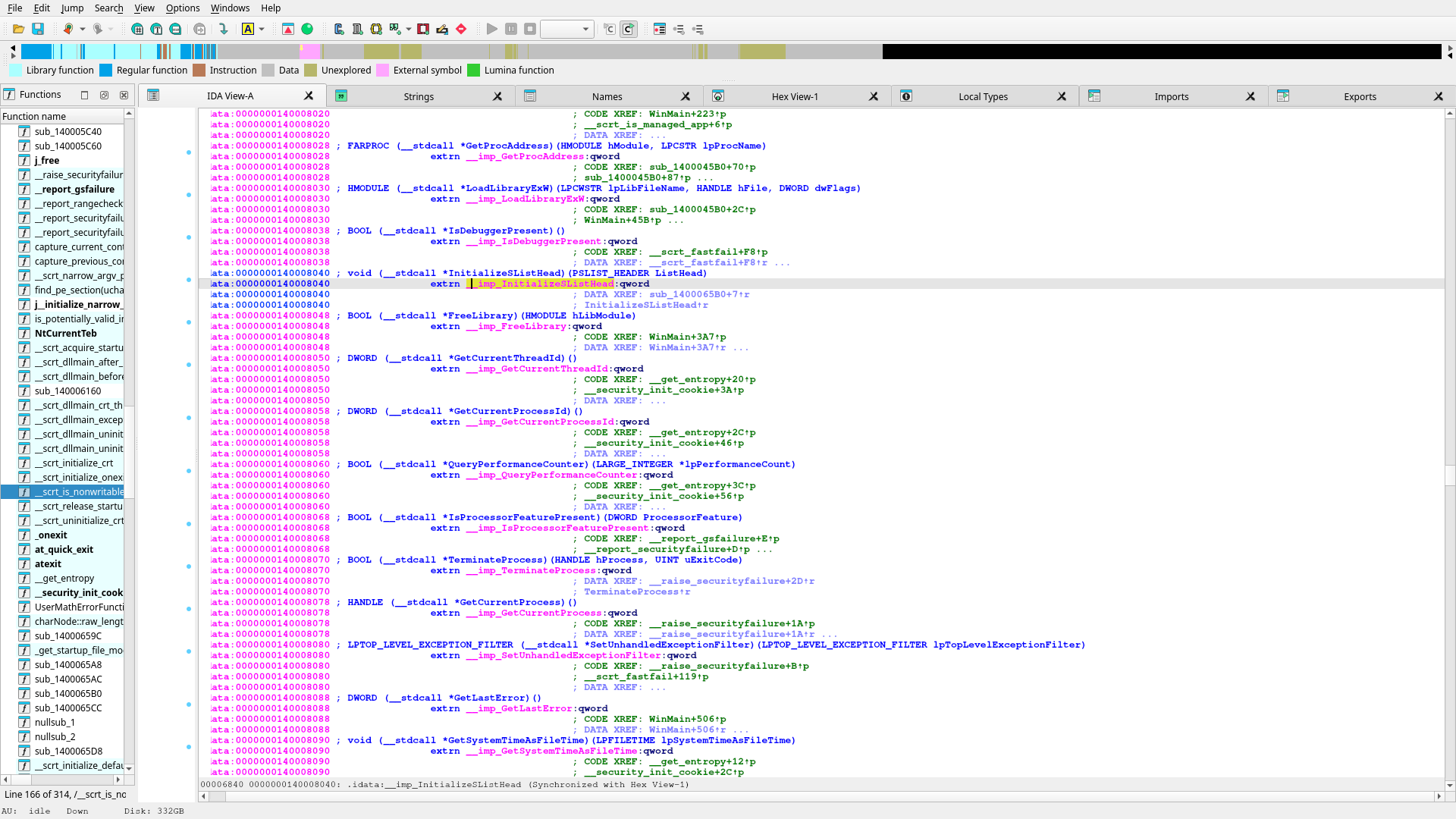
orca-flashforge.exe is a normal x64 Windows GUI PE with a clean section layout, normal imports, and visible launcher-oriented strings such as aOrcaSlicerDllW, aBambustuMain, and aCouldNotLocate.
What It Suggests
The executable likely loads the real slicer core dynamically using LoadLibraryExW and GetProcAddress rather than directly containing all slicer logic in the main startup path.
Practical Impact
The launcher clearly hands off into a loaded DLL, but the stronger downstream target is now the real Flashforge DLL path already opened in IDA: Orca-Flashforge.dll through orca_flashforge_main, not another pass over the launcher shell by itself.
Useful Findings In the EXE
x64 Windows GUI PE
entry point in .text
imports include:
LoadLibraryExW
GetProcAddress
GetModuleFileNameW
GetModuleHandleW
CreateWindowExW
GetMessageW
DispatchMessageW

key strings:
aOrcaSlicerDllW
aBambustuMain
aCouldNotLocate
aOrcaSlicerExe
What Was Not Found
Literal strings such as:
CP TOOLCHANGE
Ramming start
Cooling park
single_extruder_multi_material
purge_in_prime_tower

did not show up as normal loaded strings
in the first IDA strings pass on the EXE/DLL pair already tried.
Reading Of The Result
| Finding |
Meaning |
aOrcaSlicerDllW present |
The launcher likely names and loads a DLL that contains substantial slicer logic. |
aBambustuMain present |
The executable likely resolves a named entry function from that DLL and transfers control into it. |
LoadLibraryExW and GetProcAddress imported |
This supports the launcher/bootstrap interpretation rather than a monolithic single-binary interpretation. |
| No literal AD5X swap strings found |
The final swap text may be assembled dynamically, stored in another module, or encoded in a way that simple string search does not expose directly. |
This does not weaken the project. It sharpens it. The binary hunt is no longer “find the swap logic somewhere in the launcher.” It is “follow the launcher into the real slicer DLL/module boundary and continue the search there.”
Inline Binary Evidence
These screenshots are local assets generated from the FireShot captures taken during the IDA and binary-inspection pass. They are included here so the launcher interpretation is visible inside the dossier instead of living only in chat history.
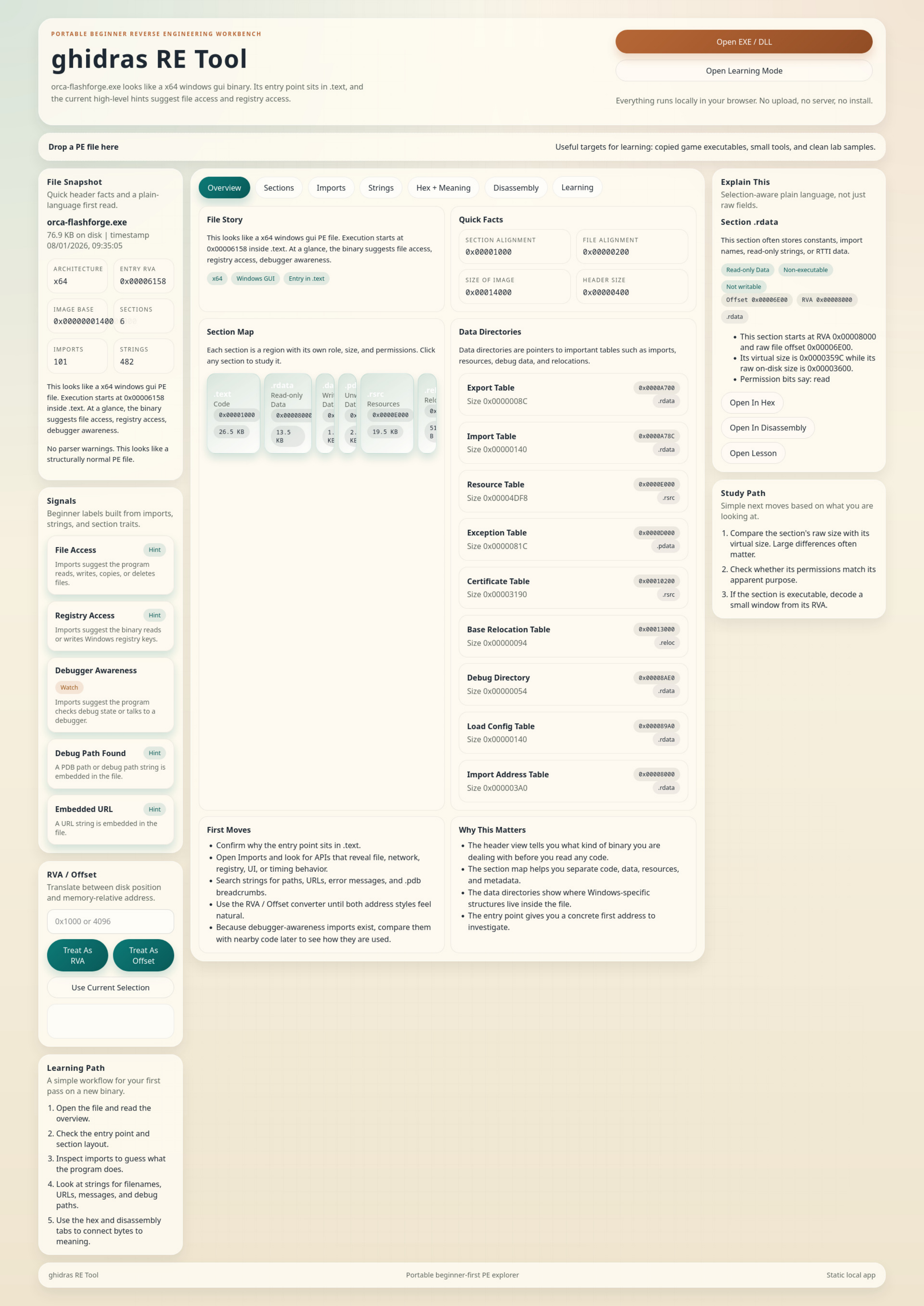
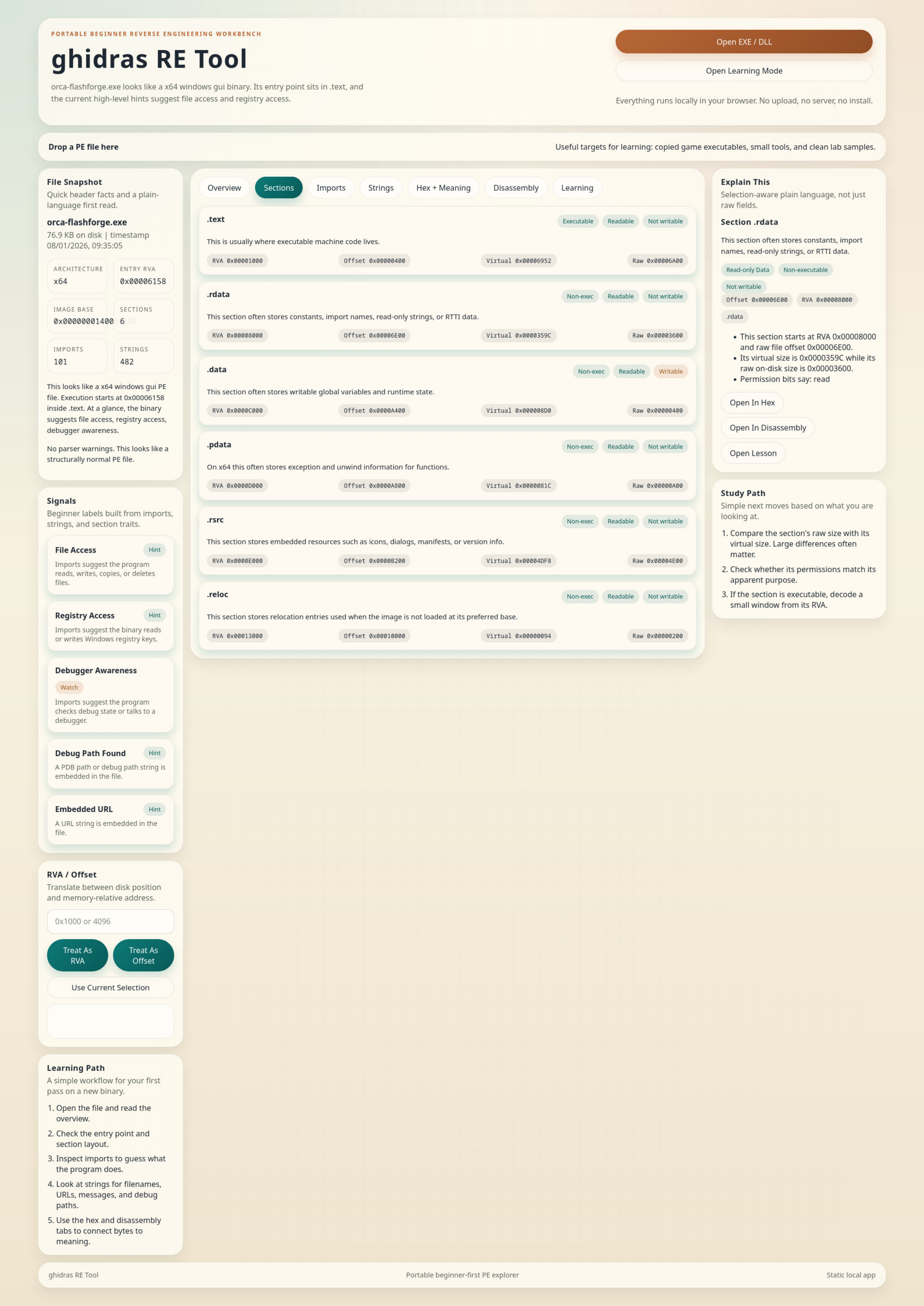
Capture 005: PE Overview
The first-pass executable inspection shows a normal x64 PE layout. This supported the initial conclusion that the file is inspectable and not obviously packed or opaque.
ghidra_re_tool_005.png
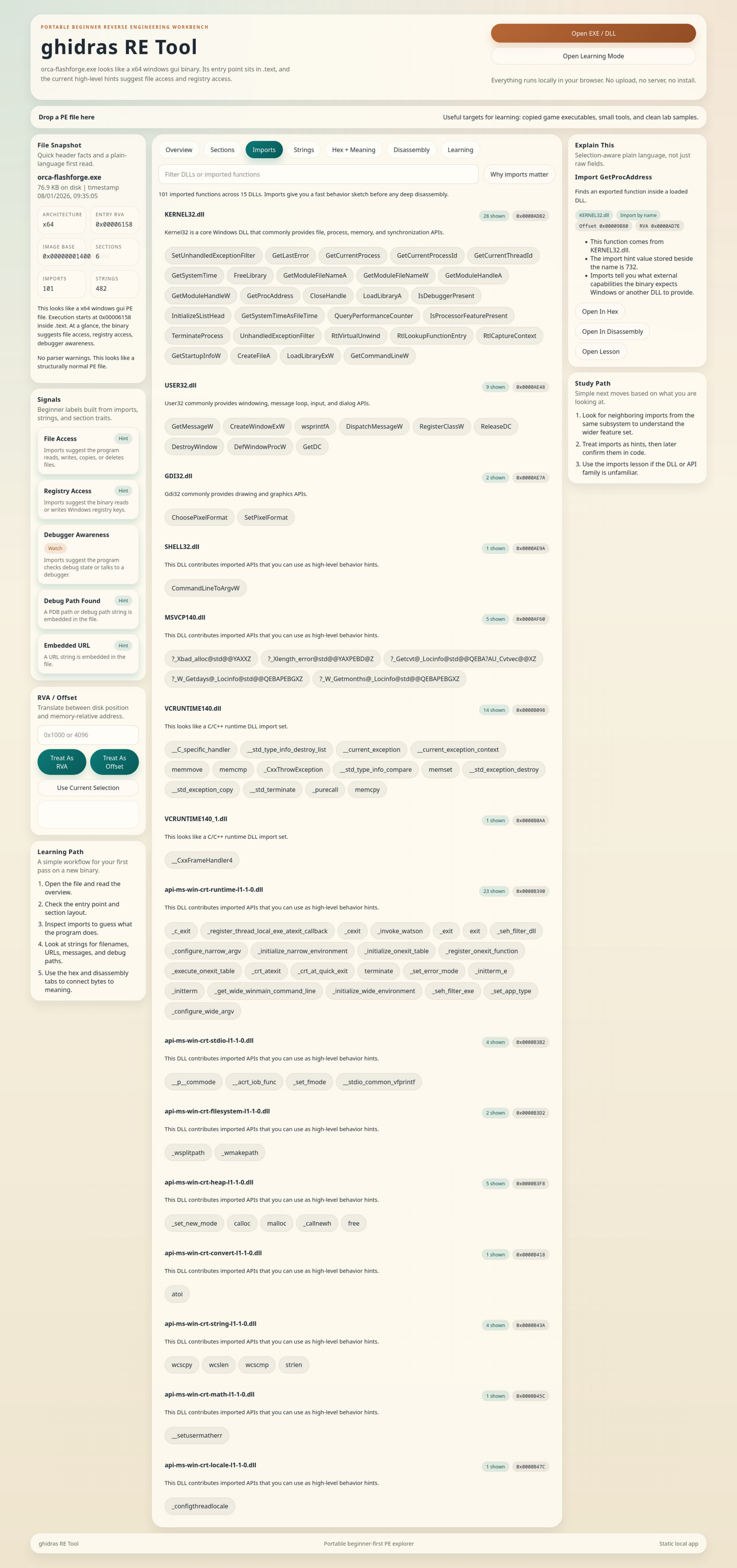
Capture 006: Imports and Layout
The import surface matters because it exposes LoadLibraryExW and GetProcAddress, which fit the launcher/bootstrap interpretation rather than a single self-contained slicer binary.
ghidra_re_tool_006.png
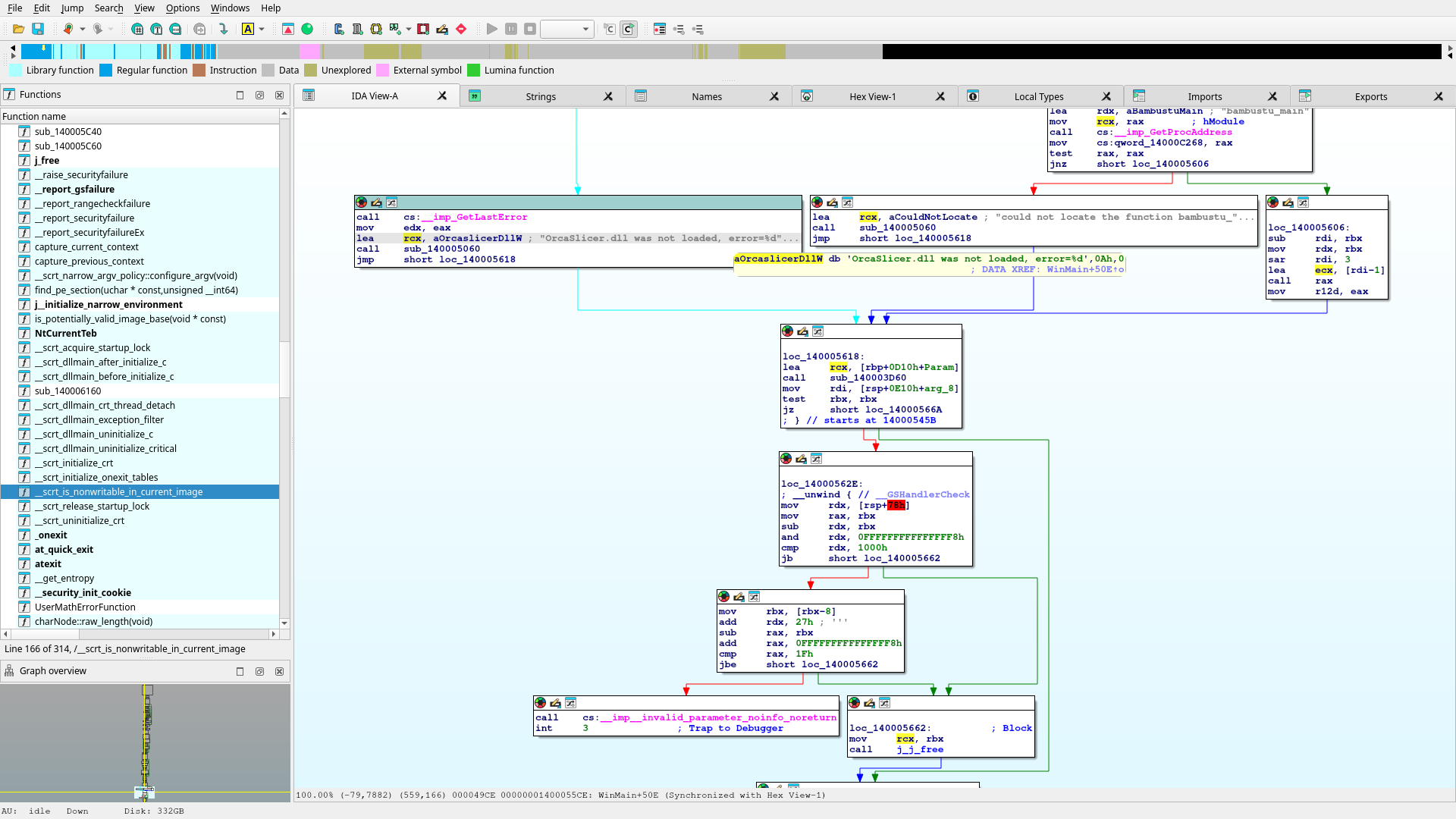
Capture 007: String-Level Clues
This is the important pivot: visible names like aOrcaSlicerDllW and aBambustuMain point to a downstream loaded module. That is why the next search target is the resolved DLL path and handoff function, not just WinMain.
ghidra_re_tool_007.png
IDA Graph: Loader Handoff Region
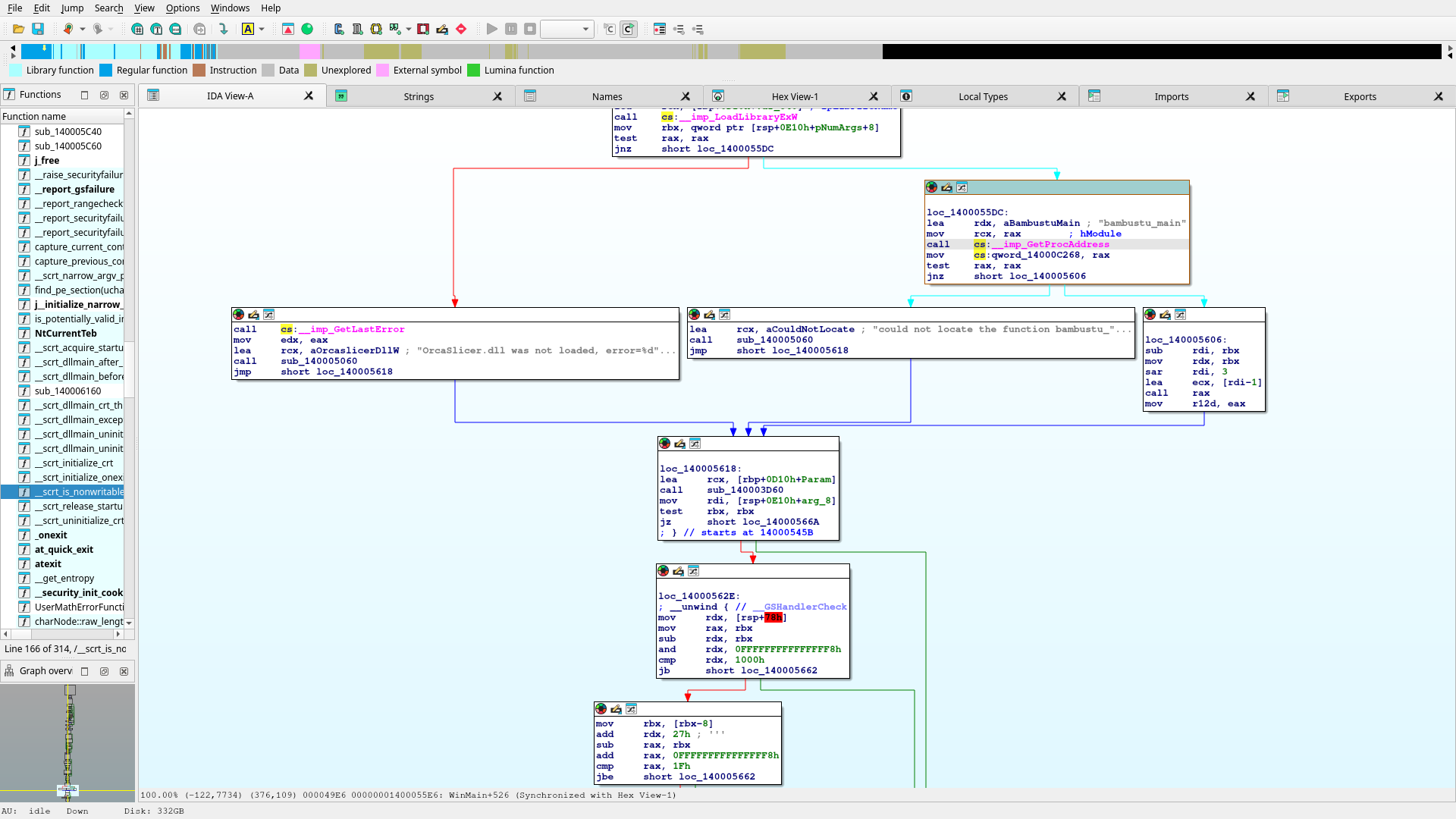
This capture is the first useful in-graph confirmation that the launcher is resolving bambustu_main while also carrying a nearby failure branch for OrcaSlicer.dll was not loaded. That is the handoff seam to keep following.
20260422_14h56m46s_grim.png
Launcher Proof Sequence
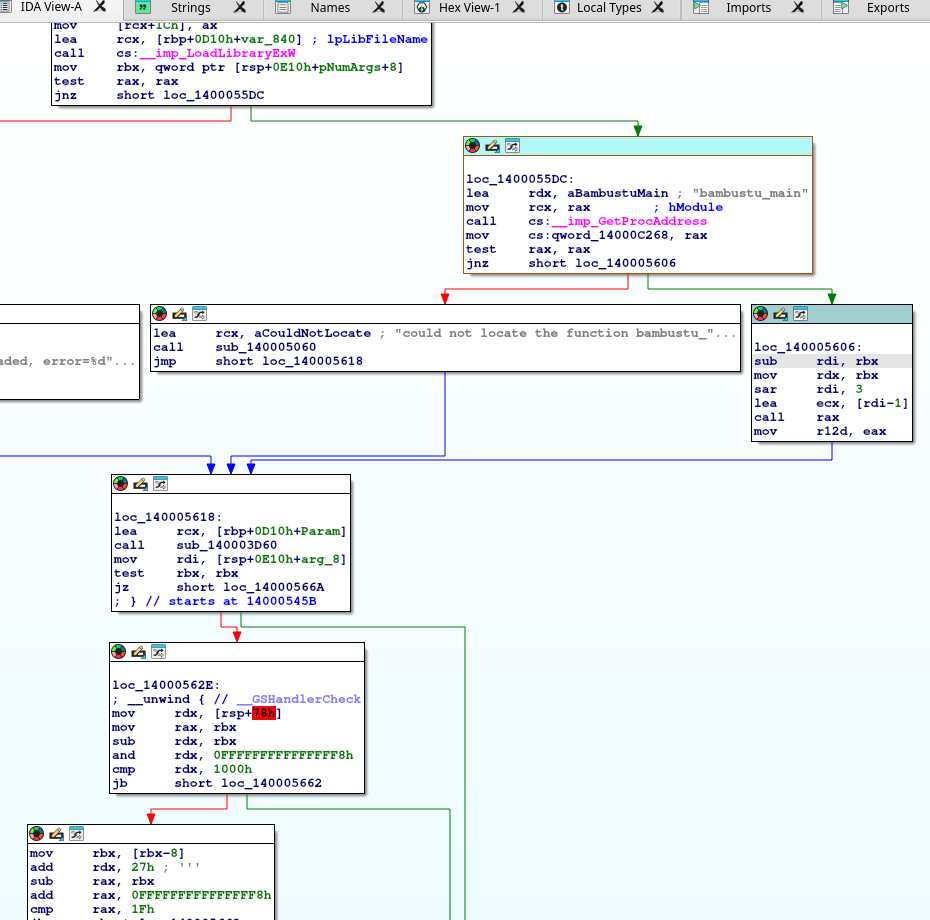
The later IDA passes moved this from inference to proof. We now have a clean visual sequence showing the launcher loading the slicer DLL, resolving bambustu_main, storing the function pointer, and then calling it indirectly on the success path. That is the exact seam between bootstrap code and the real slicer entry.
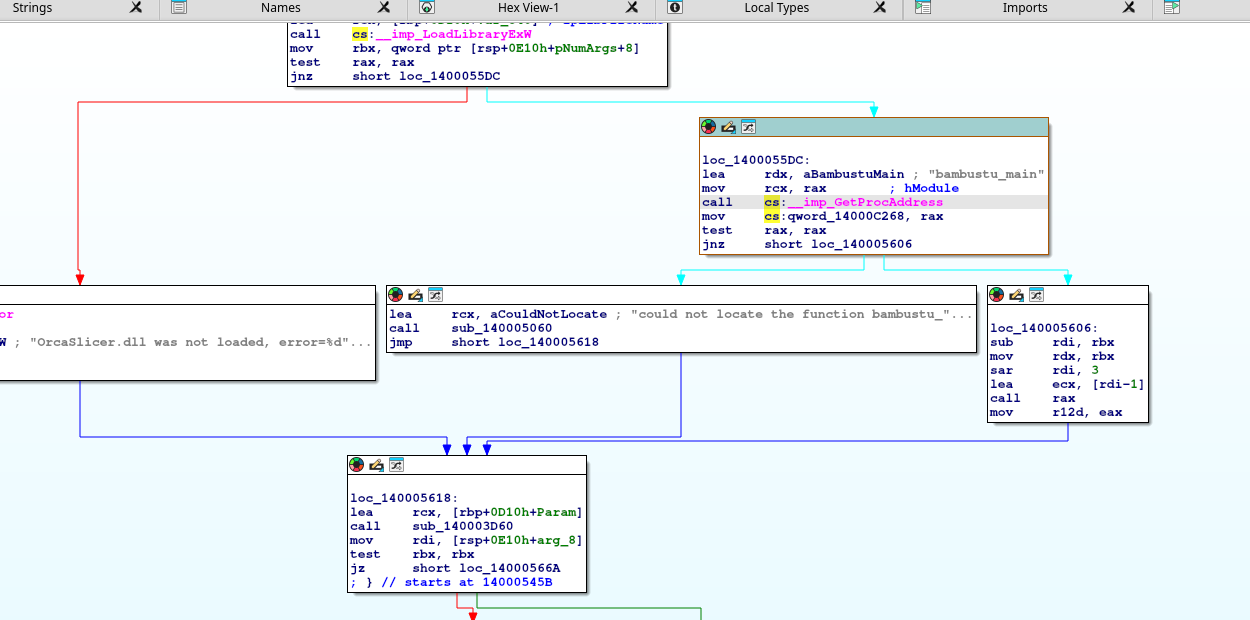
Cropped Step 1: Resolve DLL Entry
The launcher block at loc_1400055DC loads rdx = aBambustuMain, passes the module handle in rcx, calls GetProcAddress, stores the result into qword_14000C268, and branches to the success path at loc_140005606 only if the pointer is non-null.
loader_getproc_block.png
Cropped Step 2: Indirect Handoff
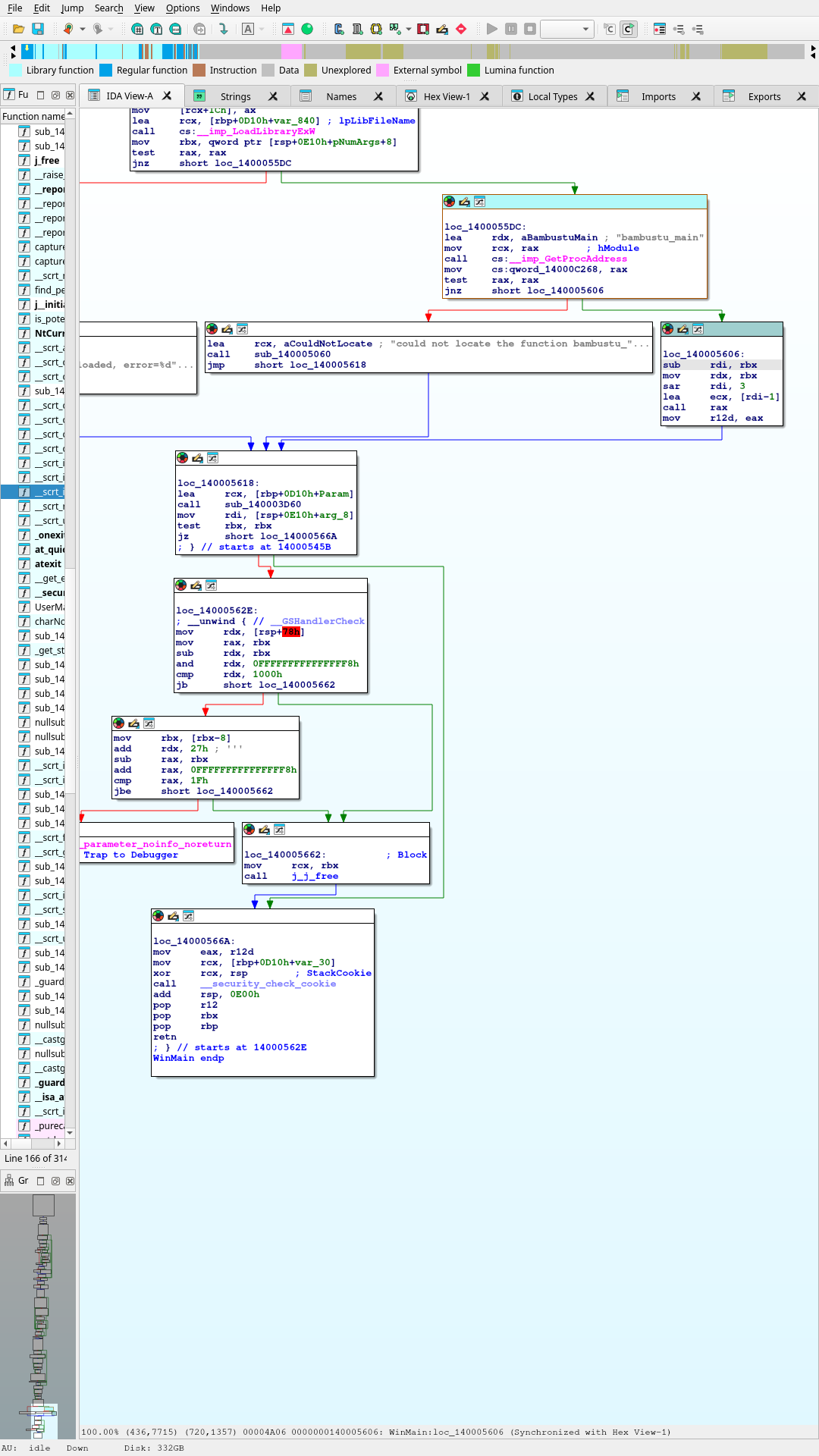
The success path at loc_140005606 performs the actual call into the DLL entry. The graph shows an indirect call rax after preparing a small argument value with lea ecx, [rdi-1]. This proves the launcher is transferring control into the function resolved from the DLL, not implementing the slicer core locally.
launcher_handoff_call_rax.png
Cropped Step 3: Data-Slot Detour
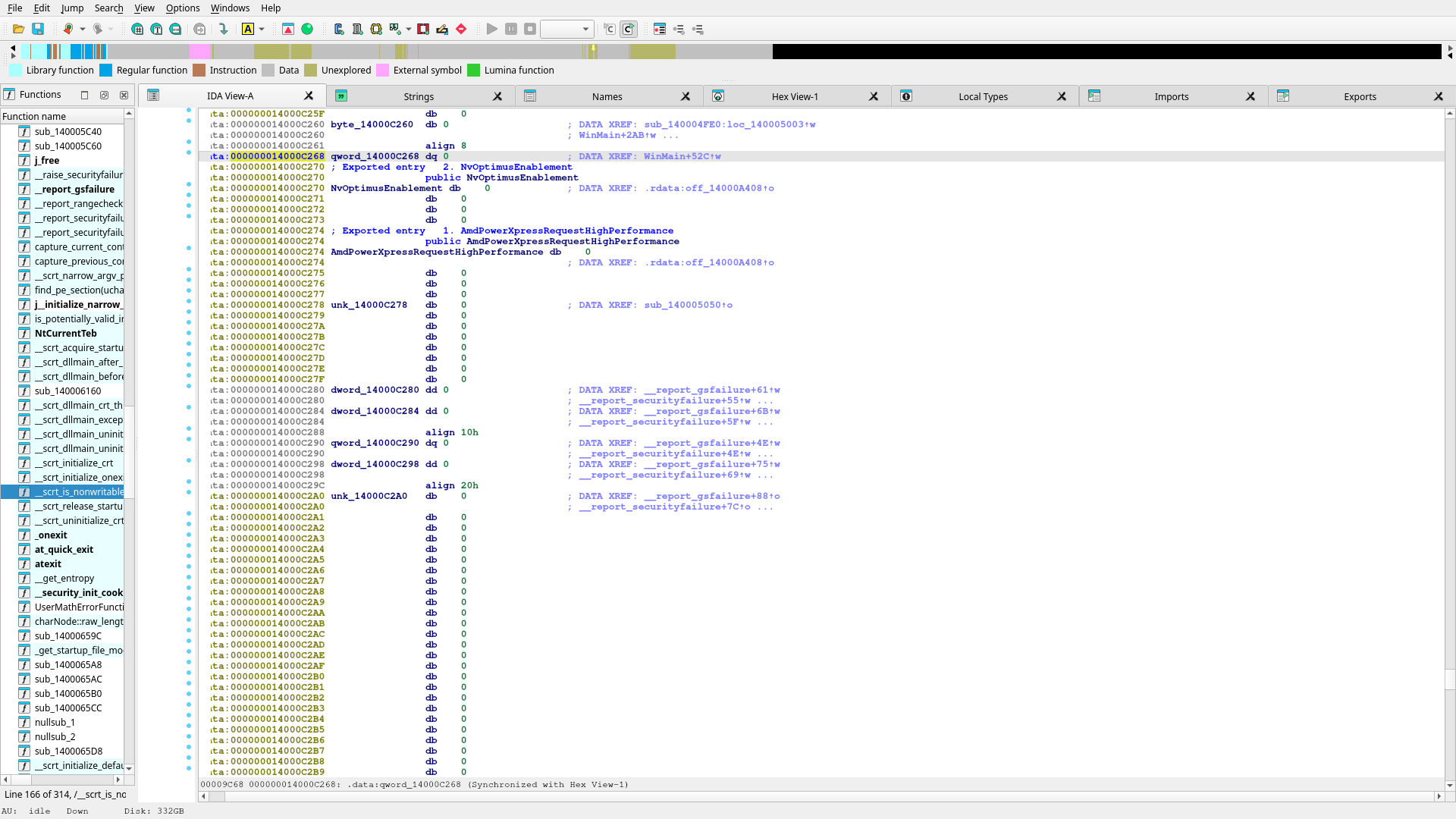
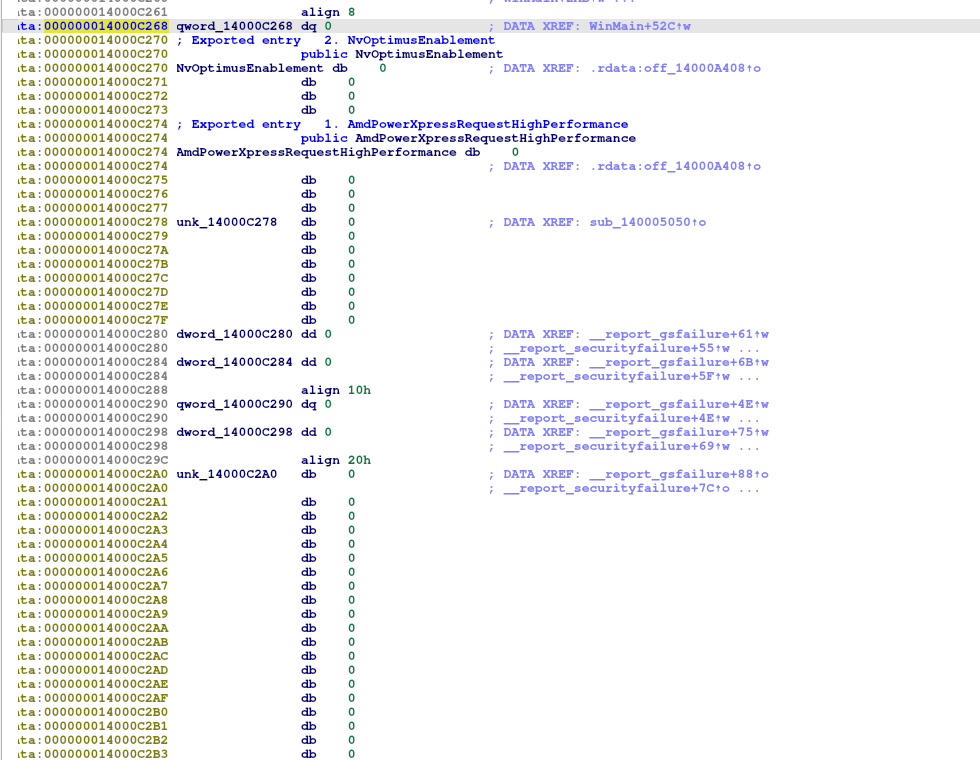
This detour matters because it explains one false start during analysis. Following qword_14000C268 by xref only lands on the write site. It does not by itself expose the later indirect call. That is why the success block had to be followed directly to prove the handoff.
qword_store_detour.png
| Stage |
Observed Action |
Meaning |
| DLL load |
LoadLibraryExW is called with the slicer DLL path/name. |
The executable is not the slicer core. It explicitly loads another module. |
| Entry resolution |
GetProcAddress(hModule, "bambustu_main") |
The launcher resolves a named entry function instead of embedding all logic in WinMain. |
| Pointer store |
Result stored in qword_14000C268 |
The launcher keeps the DLL entrypoint as runtime state. |
| Success path |
Branch to loc_140005606 |
This is the handoff corridor to the real loaded module. |
| Indirect call |
call rax visible in the success block |
Control is definitively transferred into the DLL entry. |
The launcher proof is still valid, but the stronger downstream target is now the Flashforge-native DLL path we actually opened and traced: Orca-Flashforge.dll through orca_flashforge_main. The practical meaning is simple: the executable shell is no longer the engineering bottleneck. The next useful work is inside the real Flashforge DLL startup chain, not another round of launcher string archaeology.
Original Screenshot Links
Import Thunk Detour
Jumped into the import slot rather than the caller. Kept here because it documents the false path that had to be corrected.
20260422_15h01m29s_grim.png
Caller Block Restored
Shows the WinMain+526 caller block with GetProcAddress, aBambustuMain, and the success branch.
20260422_15h04m46s_grim.png
Data-Slot Detour
Shows the data-store location for qword_14000C268, which by itself was not enough to prove the handoff.
20260422_15h06m34s_grim.png
Success Path / call rax
The most important screenshot in the sequence. This one proves the launcher is calling into the resolved DLL entry.
20260422_15h08m25s_grim.png
DLL Entrypoint Trace
After proving the launcher handoff, the next job was to verify that the Flashforge DLL exposes a real application entry and to separate useful call-chain leads from low-value allocator noise. That work is now partially complete. The DLL does expose a Flashforge-specific entrypoint, and we have already ruled out at least two early helper branches as too low-level to be the AD5X swap selector.
Confirmed
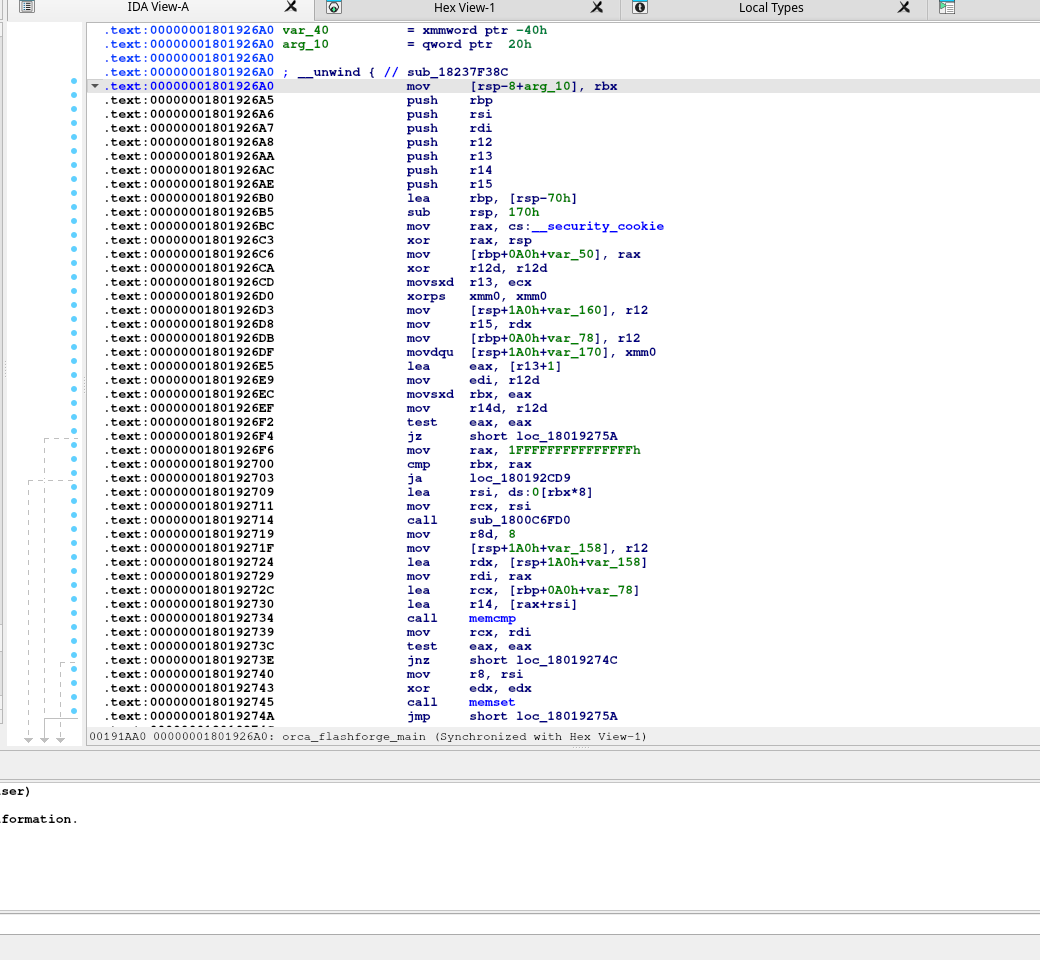
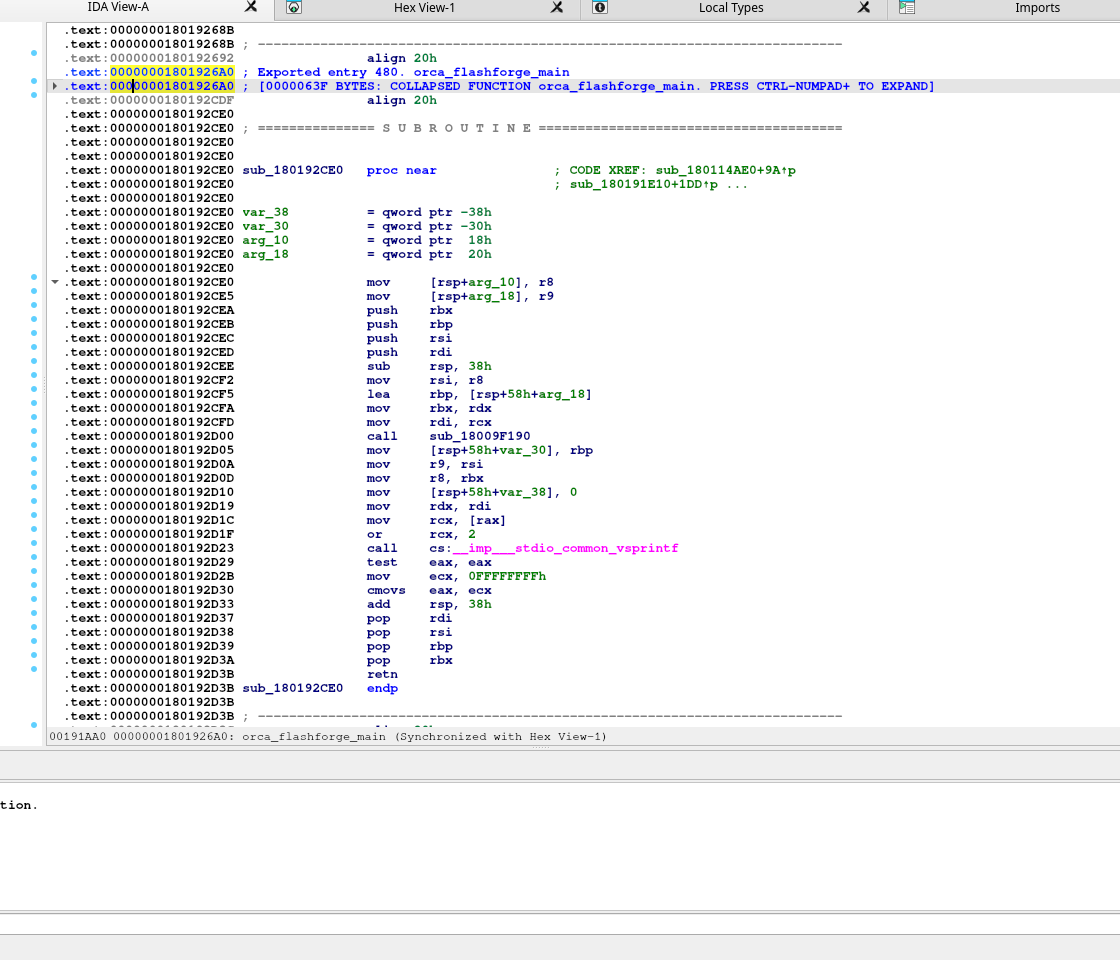
Orca-Flashforge.dll exports orca_flashforge_main at 0x1801926A0. This is a stronger lead than the older launcher-side bambustu_main string because it is a real symbol inside the Flashforge DLL itself.
What Failed
Broad symbol and string searches for bambu, filament, purge, wipe, cool, and similar terms produced poor signal in the DLL. That means entrypoint-first call tracing is the right method here, not keyword fishing.
Current Read
orca_flashforge_main is a substantive function with real setup logic. Early helpers sub_1800C6FD0 and sub_1800D37A0 both look like low-level memory, bounds, or parser/container support, not AD5X-specific slicer behavior.
Cropped Step 4: Real Flashforge DLL Entry
This graph confirms the exported entrypoint inside the Flashforge DLL is orca_flashforge_main. The function is not a trivial thunk. It allocates a large frame, initializes state, and immediately fans out into real helper calls.
orca_flashforge_main_graph.png
Cropped Step 5: Text View Confirmation
The text view is useful because it exposes the exact export label and confirms the entrypoint address directly. It also shows the first setup block before graph exploration, which helps distinguish real logic from folded function chunks or export-table confusion.
orca_flashforge_main_text.png
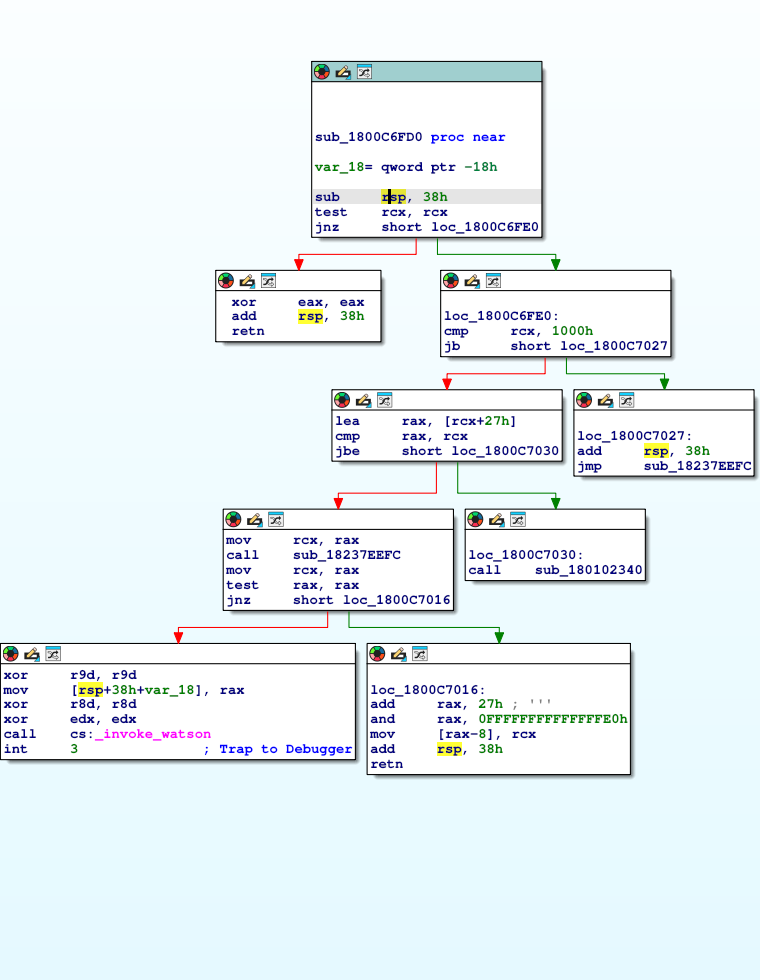
Cropped Step 6: Rejected Helper `sub_1800C6FD0`
This branch was followed because it appears early in the DLL entrypoint. The graph shows mostly null checks, size checks, allocator-style flow, and a path to invoke_watson. That is useful as elimination evidence, but not as the AD5X lead.
helper_sub_1800C6FD0.png
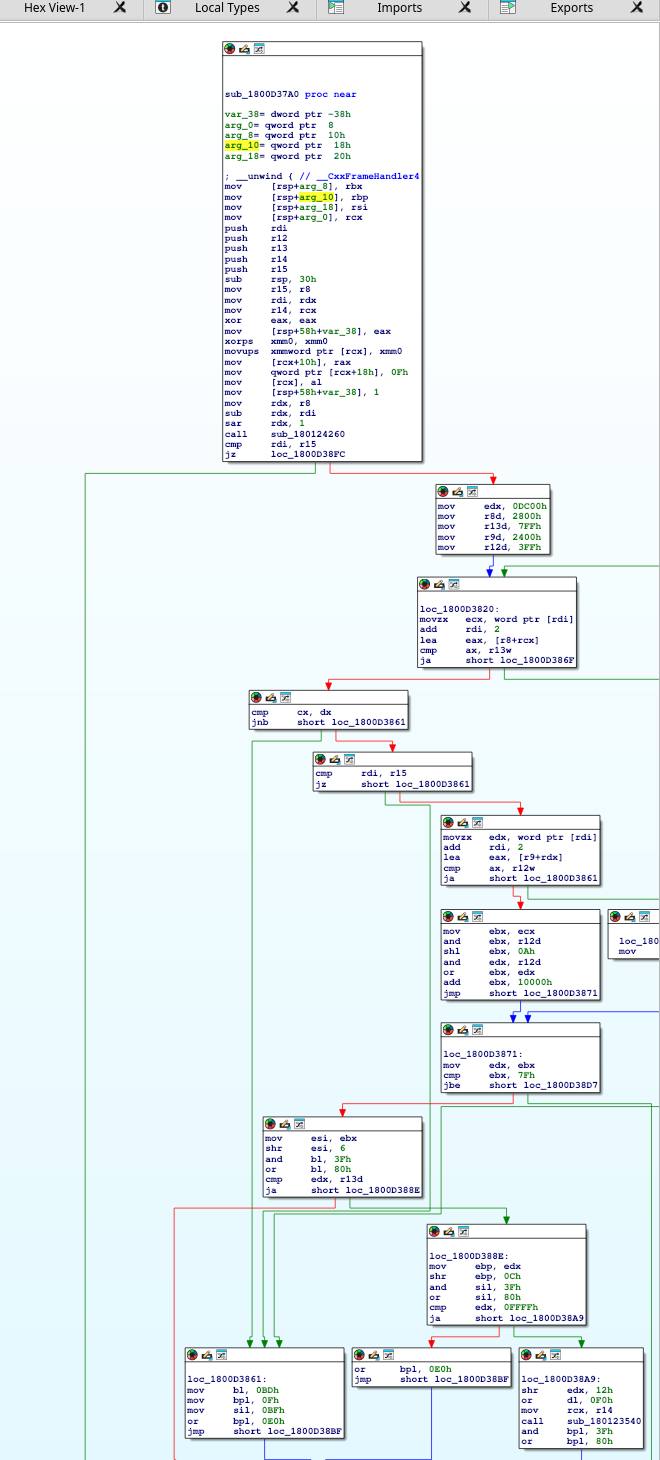
Cropped Step 7: Rejected Helper `sub_1800D37A0`
This function is larger, but still reads like low-level machinery: flag math, shifts, masks, bounds checks, and helper calls that look more like parser/container support than slicer semantics. It should not be the main reverse-engineering target.
helper_sub_1800D37A0.png
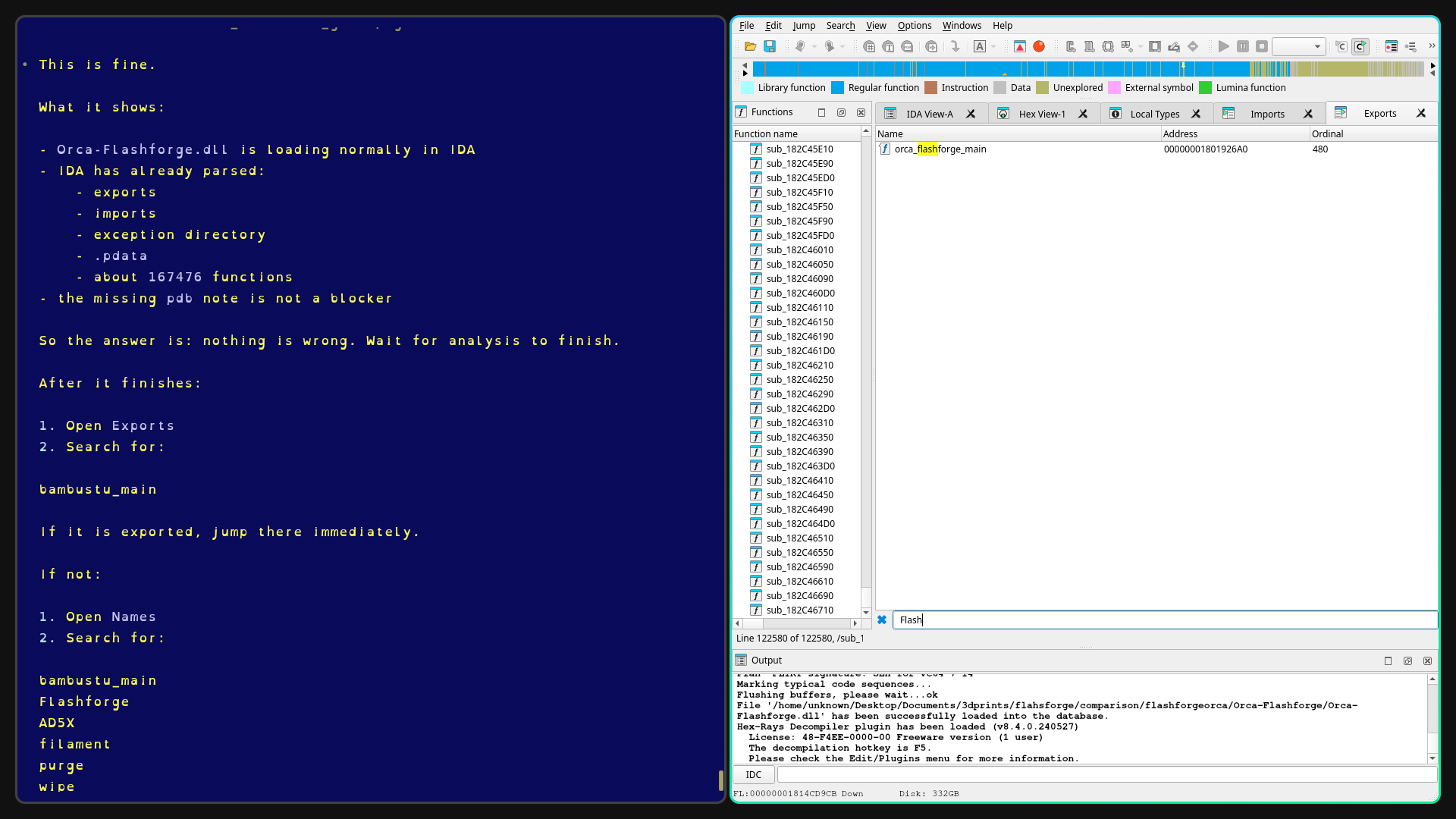
Original Export Discovery
This is the screenshot that changed the direction of the DLL work. It shows orca_flashforge_main in the export list and establishes a Flashforge-native symbol to trace instead of relying on stale upstream strings.
20260422_15h25m16s_grim.png
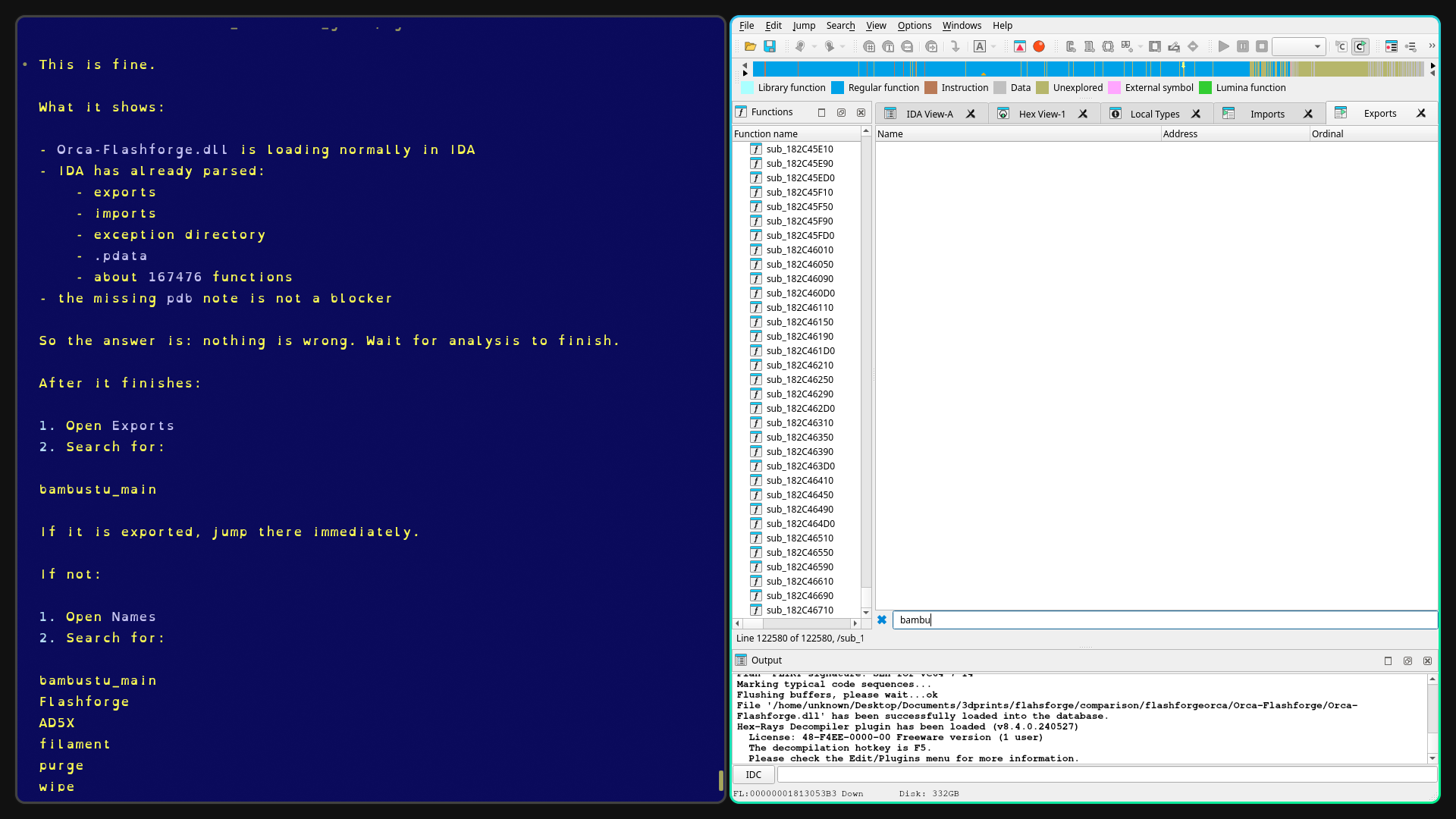
Original Search Failure
This screenshot is worth keeping because it documents a negative result: searching for bambu and similar text inside the Flashforge DLL did not provide a productive lead. That justifies the switch to entrypoint-led tracing.
20260422_15h25m06s_grim.png
| Lead |
Status |
Reasoning |
orca_flashforge_main |
Strong lead |
Real exported Flashforge DLL entry, not a guessed string or inherited launcher artifact. |
sub_1800C6FD0 |
Rejected as primary lead |
Allocator-style shape, null and size checks, and invoke_watson path suggest low-level support code. |
sub_1800D37A0 |
Rejected as primary lead |
Larger but still dominated by bit/flag logic and generic helper flow, not slicer semantics. |
| Broad text search inside DLL |
Low yield |
Searches for filament, purge, wipe, cool, and bambu did not expose useful anchors. |
The DLL phase is now in controlled call-chain tracing mode. The report should reflect that two categories of work are no longer worth repeating: stale-string hunting and low-level helper spelunking. The correct path is to stay near orca_flashforge_main and move only into helpers that look like subsystem or application initialization rather than memory plumbing.
Bootstrap Chain Narrowing
The newest IDA work moved the DLL phase forward in an important way. We are no longer just proving that orca_flashforge_main exists. We now have a clearer startup chain inside the Flashforge DLL itself, and several branches have been eliminated with enough confidence that they should be treated as dead ends in future sessions.
New Strong Lead
orca_flashforge_main looks like an argument-and-startup normalizer that eventually hands control into sub_180125CE0. That function is the first clearly high-level bootstrap coordinator seen inside the Flashforge DLL.
What Changed
The older “next target” phrasing around OrcaSlicer.dll and launcher-side bambustu_main is now weaker than the evidence inside Orca-Flashforge.dll. The working path is no longer hypothetical: orca_flashforge_main -> sub_180125CE0 -> sub_1801BB100 is a real traced chain.
New Elimination Set
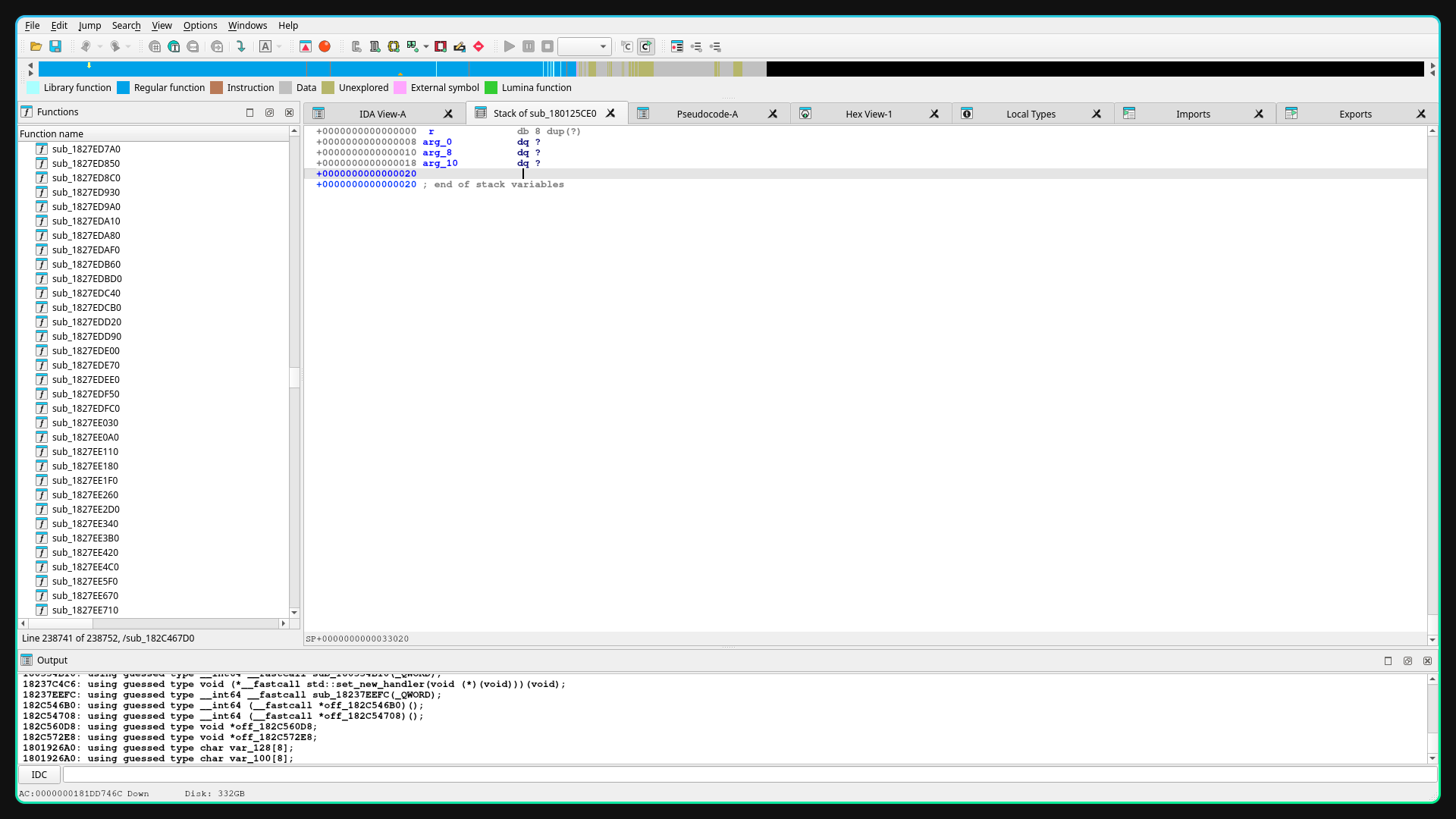
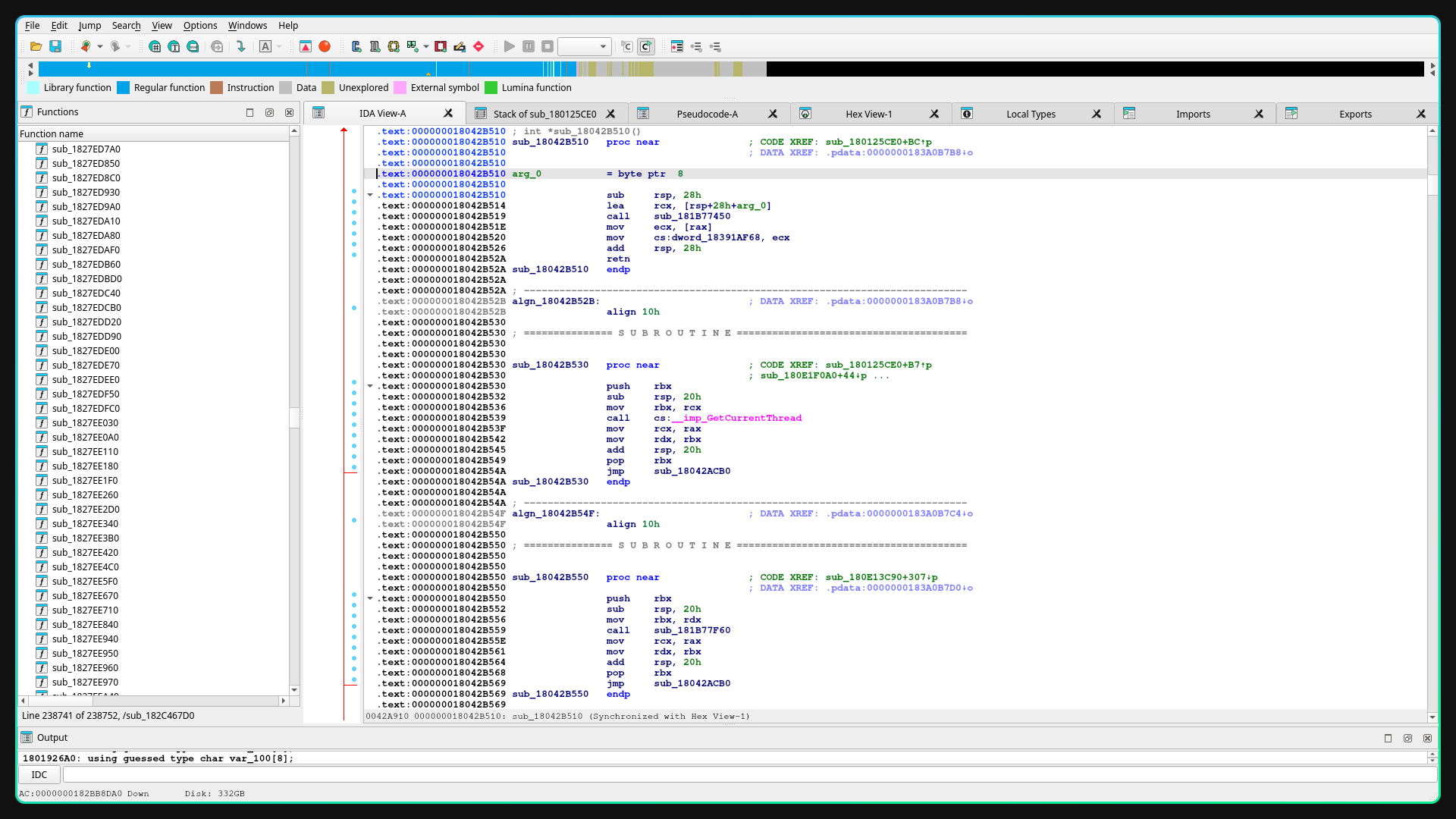
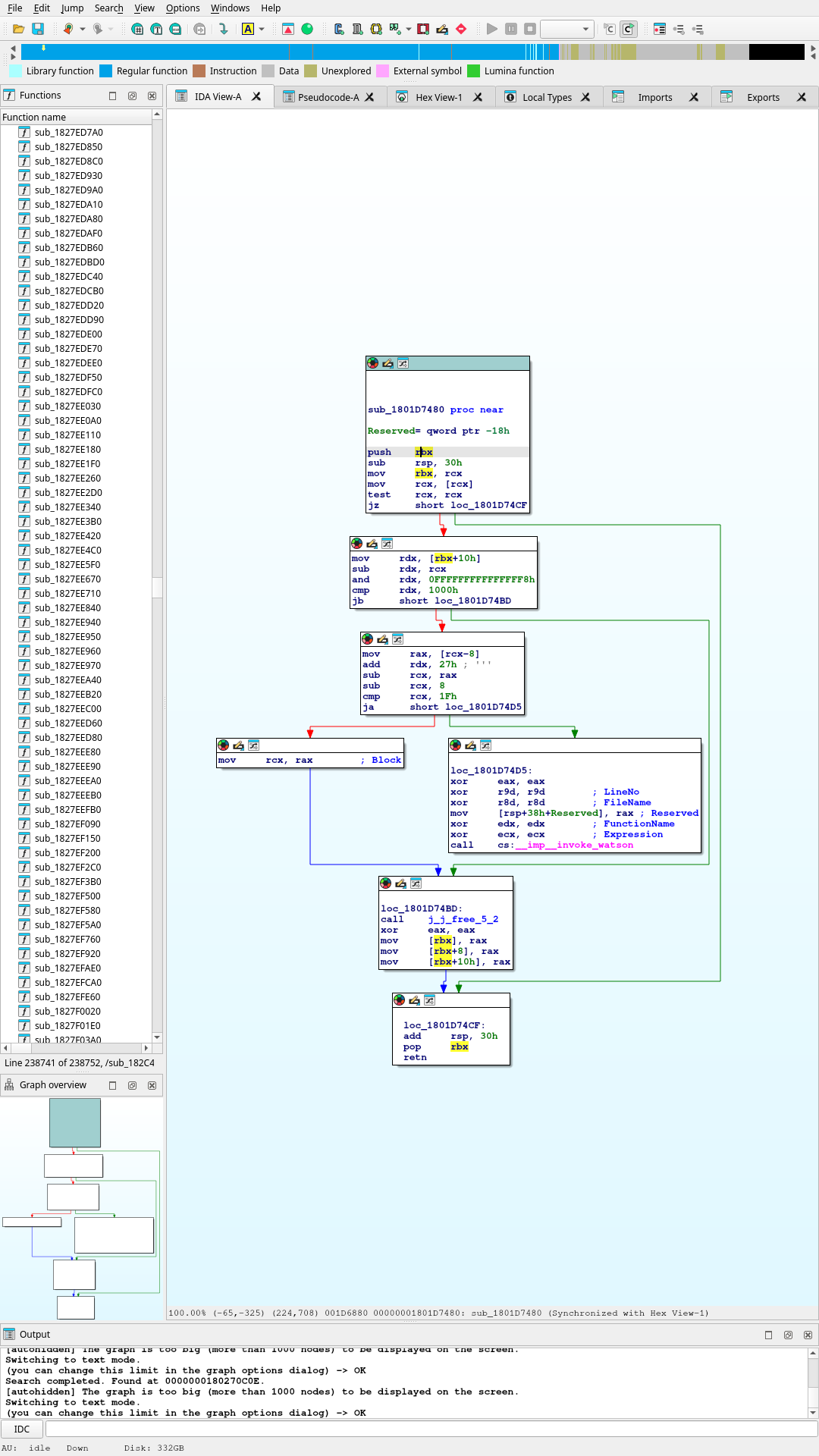
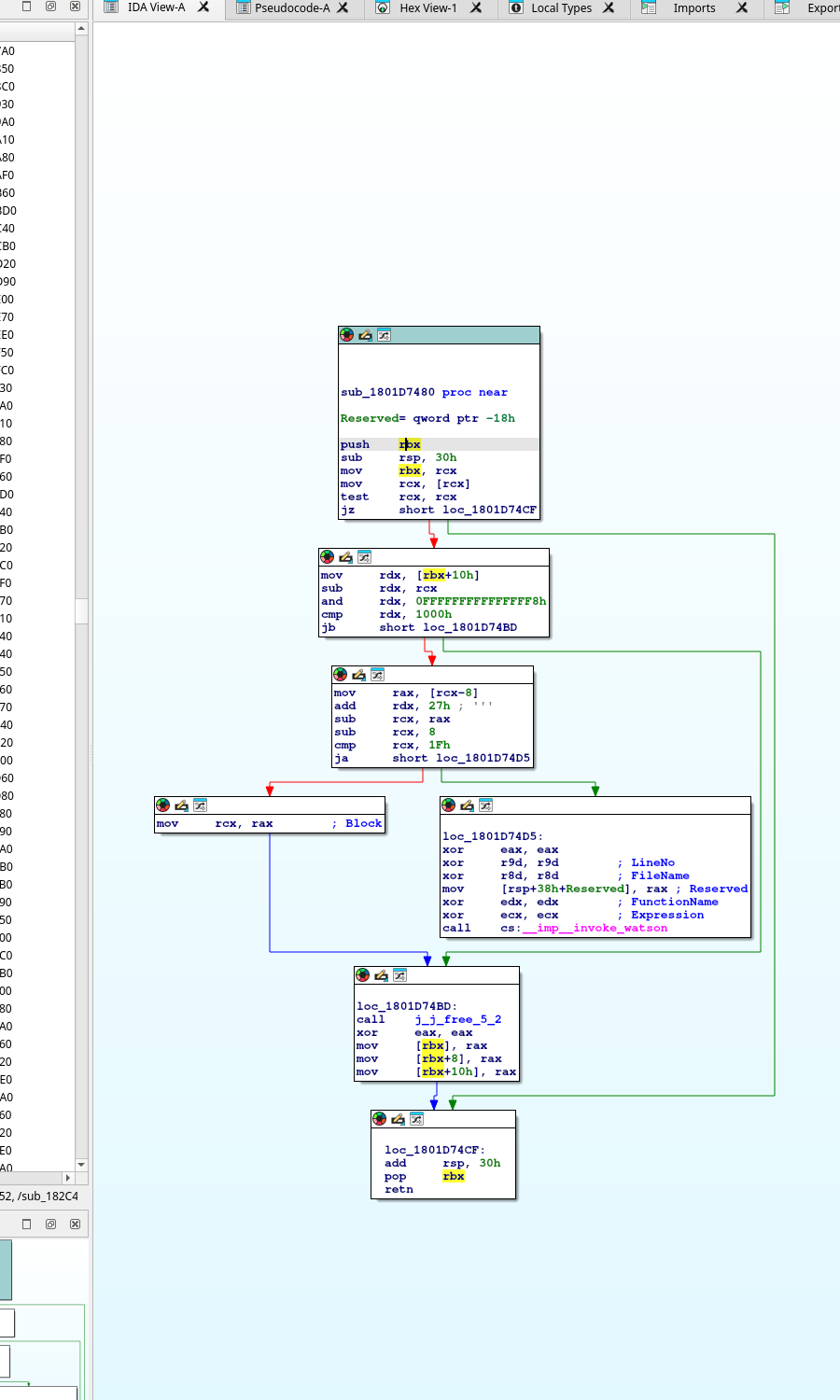
sub_18042B510 is a tiny wrapper, sub_18042B530 is a thread/bootstrap wrapper, sub_1801D7480 is cleanup/free logic, and sub_1801CEE00 is mostly vector/concurrency/container infrastructure. These are no longer credible AD5X selector targets.
Cropped Step 8: `sub_180125CE0` And `orcaslicer_main`
This crop captures the transition from generic DLL entry to a higher-level bootstrap coordinator. The key signal is not the string itself, but the fact that sub_180125CE0 is the only caller using the aOrcaSlicerMain ; "orcaslicer_main" anchor. That makes it a real startup coordination point, not a random string hit.
sub_180125CE0_orcaslicer_main_xref.png
Cropped Step 9: `sub_1801BB100` Semantic Call Slice
This crop is the current best startup-chain view. Unlike the earlier allocator and parser helpers, sub_1801BB100 shows repeated object construction, state movement, and multi-argument coordinator calls such as sub_1801A3560. That makes it a better candidate zone for real subsystem setup than the rejected low-level helpers.
sub_1801BB100_text_view.png
Raw Screenshot Links For This Pass
`aOrcaSlicerMain` Xref Popup
Raw screenshot used to derive the cropped Step 8 image. Keeps the original xref context visible for verification.
20260422_17h01m04s_grim.png
`sub_18042B510` Wrapper Confirmation
Raw screenshot showing that sub_18042B510 decompiles to a tiny global-write wrapper instead of meaningful slicer logic.
20260422_17h01m15s_grim.png
`sub_1801BB100` Text Slice
Raw screenshot for the current best semantic branch view. This is the source used to crop the Step 9 image.
20260422_17h24m09s_grim.png
| Function / branch |
Current status |
Why it matters |
orca_flashforge_main |
Confirmed DLL entry |
Real Flashforge export. Reads like startup argument normalization and bootstrap handoff, not final AD5X logic. |
sub_180125CE0 |
Primary bootstrap target |
First clearly high-level coordinator reached after startup parsing. Owns the only visible aOrcaSlicerMain use and fans into deeper application setup. |
sub_18042B510 |
Rejected |
Tiny wrapper. Pulls a value from another helper and stores it into a global. No AD5X semantics. |
sub_18042B530 |
Rejected |
Thread/bootstrap wrapper around GetCurrentThread and a jump. No slicer-specific behavior visible. |
sub_1801D7480 |
Rejected |
Cleanup/free helper with bounds validation and invoke_watson failure path. |
sub_1801CEE00 |
Rejected as selector lead |
Mostly vector growth, memmove, and concurrency/runtime support. Infrastructure, not AD5X semantics. |
sub_1801BB100 |
Current best sub-branch |
Large, stateful, and full of semantic helper calls. Best current region for finding the handoff from bootstrap into more meaningful app setup. |
sub_1801A3560 |
Promising but unconfirmed |
Multi-argument coordinator-shaped call reached from sub_1801BB100. Better shape than the rejected runtime helpers, but still needs deeper tracing. |
The practical lesson from this pass is that “deepest branch” is not the same as “best branch.” The useful call-chain is the one that becomes more semantic as it goes down. Here, that means staying near sub_180125CE0 and sub_1801BB100 and rejecting paths that collapse back into memory management, STL growth, exception handlers, or cleanup code.
Current State In One Sentence
We already have the Flashforge block family, we have proven the launcher-to-DLL handoff, and we now have a real narrowed DLL startup chain; the project is paused with the remaining unknown reduced to the exact selector inside that loaded slicer path that chooses the right concrete block instance at each swap point.
Settled
The deeper AD5X behavior is real and repeatable: unload, ramming, cooling park, load, wipe, and pressure-advance reset belong to the swap routine.
Not Settled
The patch still does not know which specific real Flashforge block instance to apply at each exact swap. That is why the truth file and v3 still diverge in ordering and one load/wipe count.
Why This Is Better
The problem is now narrow. We are no longer debugging whether Flashforge has extra logic at all. We are debugging the block-selection rule and the specific internal path that owns it.
Semantic Config Hits
This is the first DLL evidence pass that moved beyond generic bootstrap and runtime scaffolding into recognizable printer and G-code semantics. The important shift is not that we found the final AD5X selector. The important shift is that we found string-owning regions that clearly belong to printer/profile/G-code configuration and multi-material gating.
Confirmed Owner
sub_180204A30 owns the custom_gcode_toolchange.json registration block. The title, description, and sample path for custom toolchange JSON all live there.
Confirmed Semantic Region
A separate region under sub_18018DCD0+9FE shows allow_multi_materials_on_same_plate, which is the first direct same-plate multi-material gating string captured in the current report.
Still Not The Selector
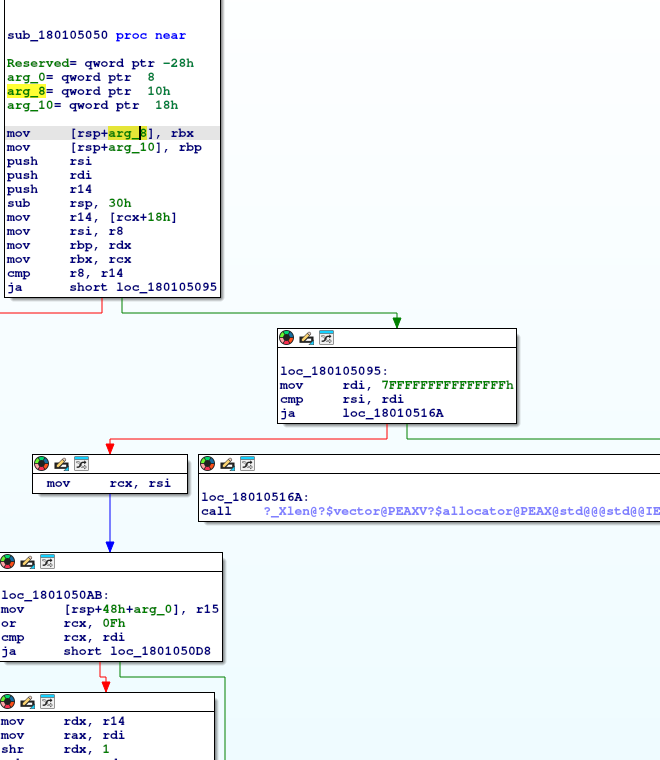
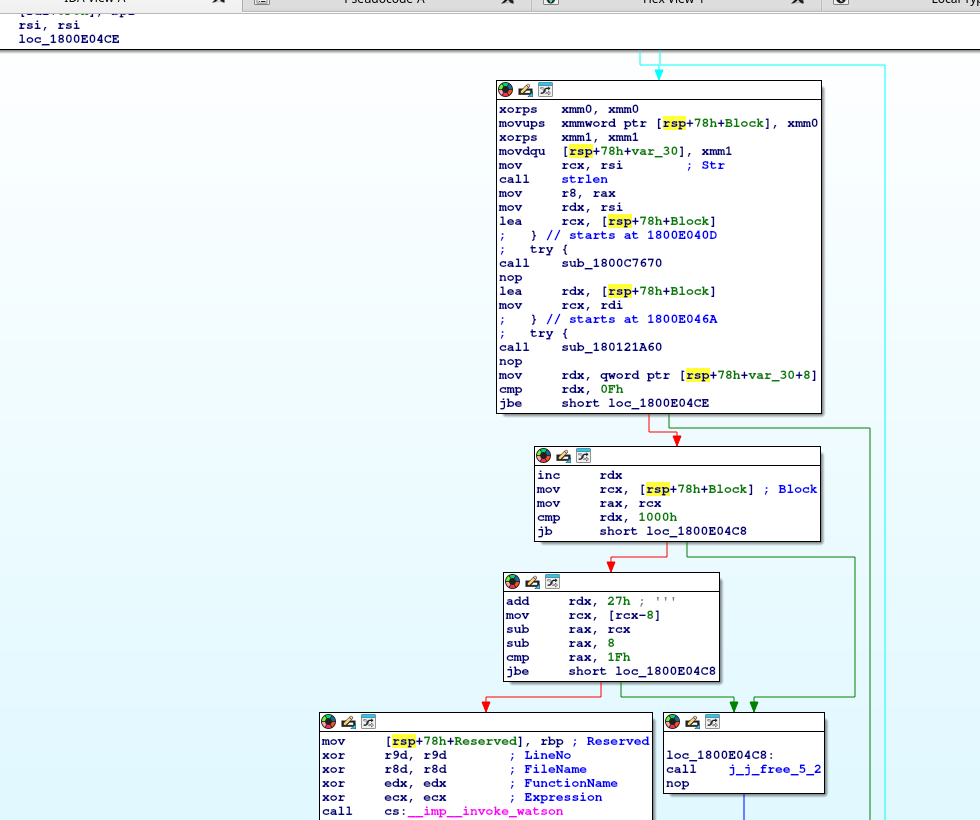
The nearby helpers sub_180105050, sub_1801160A0, and sub_1800E03A0 still collapse into support work: string/container build logic, vector growth, and stream-format setup. Useful context, wrong ownership level.
Cropped Step 10: Custom Toolchange JSON Registration
This crop is the clearest ownership proof so far for Flashforge custom toolchange JSON handling. Inside sub_180204A30+F47, the function registers a config item with the exact trio we needed: Load custom G-code, Load custom G-code from json., and custom_gcode_toolchange.json. That proves the string is not a stray resource and gives us a real enclosing function to anchor later xref work against.
custom_gcode_toolchange_registration.png
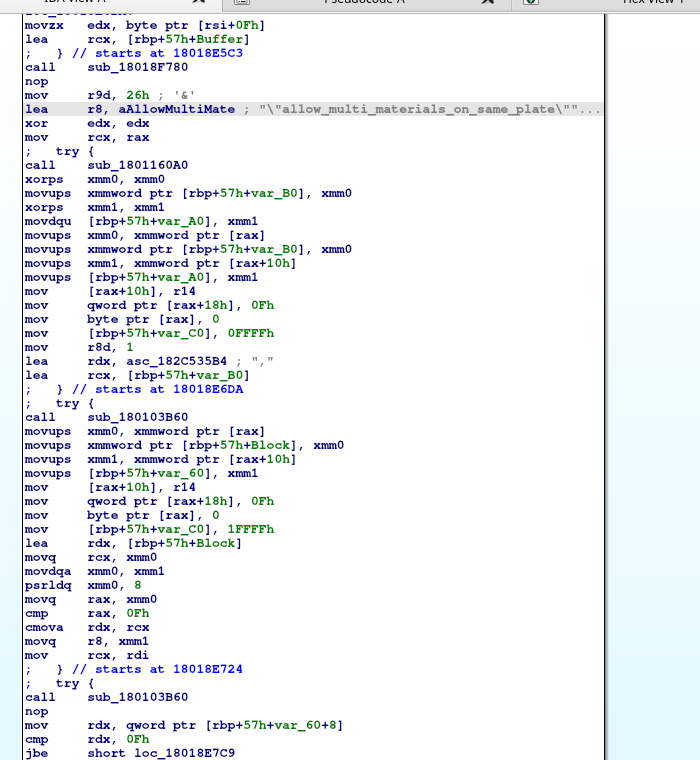
Cropped Step 11: Multi-Material Plate Flag Region
This crop matters because it is no longer talking about generic files or menus. It is talking about the rule surface itself: allow_multi_materials_on_same_plate. The region also shows that the immediate helper below it is still container support, which is exactly why the report now distinguishes semantic string ownership from actual execution ownership.
allow_multi_materials_flag_region.png
Cropped Step 12: Printer / Filament Validation Region
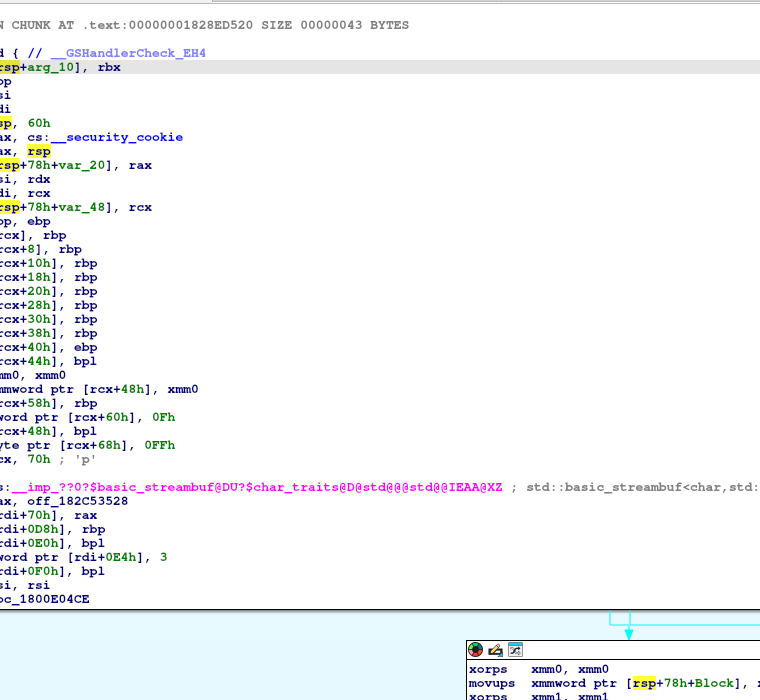
This region contains the first printer-facing validation message cluster worth keeping in the report. It shows current_printer_name in a live code path, together with nearby helper calls used during validation and message construction. It sits closer to printer/profile enforcement than the earlier startup chain and should remain one of the top tracing targets.
current_printer_name_validation_region.png
Cropped Step 13: Modified G-code Reset Message
This crop is not as central as the custom-toolchange or printer-validation regions, but it is still useful. It shows a reset/status path containing allGcodes2Modified, which helps map where the Flashforge UI tracks G-code state changes and default resets. That may become relevant later if toolchange JSON edits are being normalized or reverted through the same settings layer.
all_gcodes_modified_reset_region.png
Cropped Step 14: Ghidra Semantic String Workflow
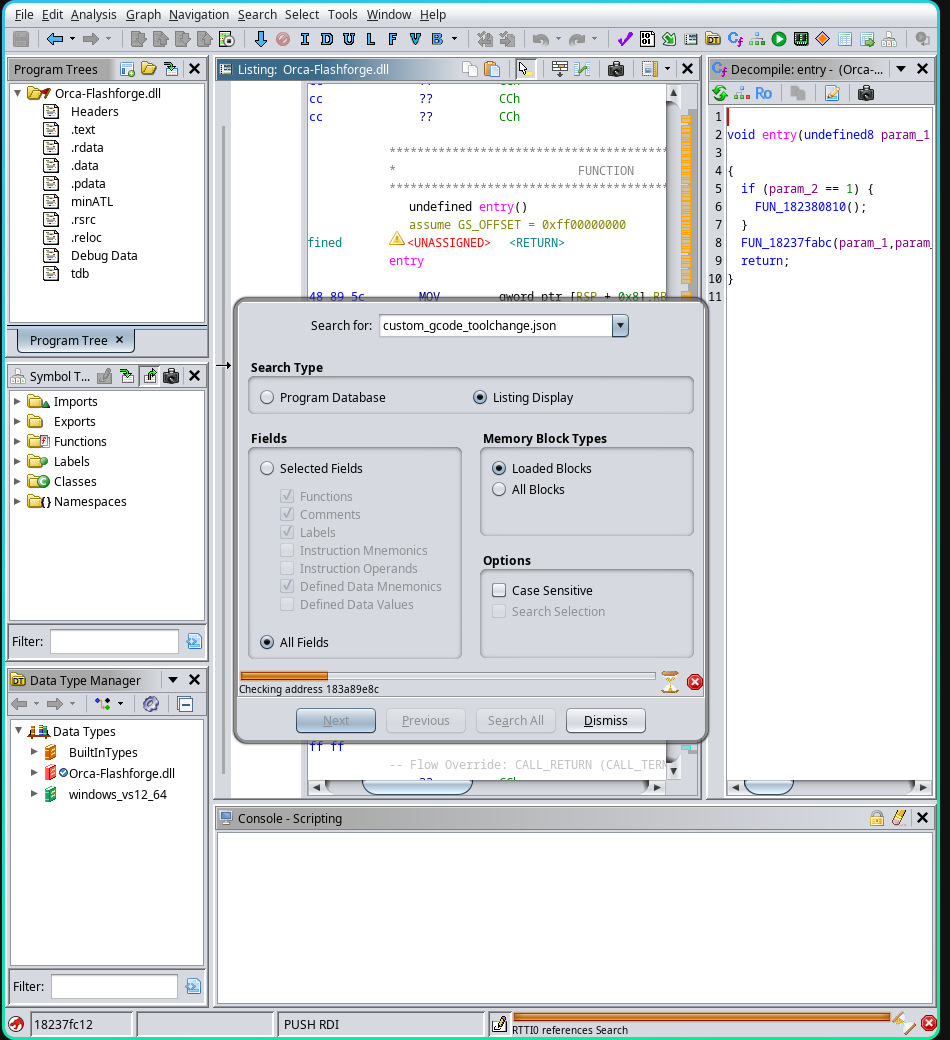
This crop captures the point where the reverse-engineering workflow finally stopped fighting startup noise and started using semantic anchors directly. The important lesson is procedural: search for the exact strings that already surfaced in IDA and the comparison notes, then jump from the string owner to the enclosing function. In practice, this is what moved the work away from giant bootstrap graphs and into configuration- and validation-owning regions.
ghidra_string_search_workflow.png
Text Export Inventory
| Region |
What it proves |
Why it is not enough alone |
sub_180204A30+F47 |
Owns custom toolchange JSON registration strings and labels. |
Still appears to be registration/config entry creation, not the runtime selector that decides AD5X swap bodies. |
sub_18018DCD0+9FE |
Owns allow_multi_materials_on_same_plate string usage. |
The immediate helper around it still falls into string/container support. We need the larger owner function context, not only the helper. |
sub_180125CE0+8230-style validation region |
Shows current_printer_name and nearby printer/profile validation flow. |
Message-building helpers are mixed into the same region. The enclosing validator/owner still needs cleaner extraction. |
sub_1800F7F80+438 |
Tracks modified G-code reset messaging. |
Useful for settings state, but not yet tied directly to toolchange generation or AD5X selector ownership. |
This is the first report section where the evidence is clearly semantic rather than structural. The correct next move is not “find any deeper helper.” The correct next move is “stay at the function-owner level for these semantic strings and avoid being dragged back into generic support code.”
Resume Checklist
A successor should be able to restart this project without re-reading every branch log. The checklist below is the shortest defensible path back into the work.
| Step |
Action |
Expected outcome |
| 1 |
Open the real Flashforge truth file and the current v3 patch output side by side. |
Re-ground the work in the exact remaining mismatch: ordering, tower-context, and one load/wipe count gap. |
| 2 |
Open Orca-Flashforge.dll and jump to semantic anchors rather than startup helpers. |
Avoid wasting time in vector growth, cereal registration, cleanup, stream formatting, and exception scaffolding. |
| 3 |
Map the owner functions for custom_gcode_toolchange.json, current_printer_name, invalid filament_id, and allow_multi_materials_on_same_plate. |
Identify whether Flashforge’s selector is gated by printer/material/config state before it emits G-code. |
| 4 |
Keep every selector hypothesis pinned to the same truth file. |
Maintain a stable acceptance target instead of drifting between proxy comparisons. |
| 5 |
Only after the selector is credible, return to DLL-hook or export-time replacement work. |
Prevent a runtime integration effort from hardening the wrong rule set. |
The single biggest process lesson from this project is that deep call-chain descent is not automatically high value. Semantic ownership beats depth.
What Would Be Next If Resumed
If this project is resumed later, the next phase should stop trying to rediscover the existence of the swap body. That work is finished. The only high-value work left is to map the selector that chooses the right block instance for each real toolchange and to keep narrowing the real DLL call chain until the slicer-core ownership becomes obvious.
| Priority |
Task |
Reason |
| 1 |
Stay inside Orca-Flashforge.dll and keep tracing from orca_flashforge_main through sub_180125CE0 and sub_1801BB100 |
This is now the strongest proven path. It is better than the older launcher-side bambustu_main clue because it is anchored to real Flashforge DLL symbols and already-traced internal calls. |
| 2 |
Trace the string-owning semantic regions before returning to deeper bootstrap branches |
The newest findings around custom_gcode_toolchange.json, current_printer_name, and allow_multi_materials_on_same_plate are higher-value than more blind descent into startup scaffolding. |
| 3 |
Document and reject each dead helper branch explicitly in the report and notes |
This avoids re-investigating the same allocator, cleanup, vector-growth, and stream-format paths later and keeps the RE tree disciplined. |
| 4 |
Cluster real Flashforge blocks by transition and tower anchor |
The truth file suggests transition alone is not enough. Tower-coordinate context is likely part of the selector. |
| 5 |
Add tower-coordinate similarity to the patch selector |
v3 already matches by transition and still misses truth. The next obvious discriminator is local tower position. |
| 6 |
Add sequence-phase context |
The opening swaps behave differently from later swaps. Early-job context may be a separate rule branch. |
| 7 |
Re-diff every selector change against the same truth file |
We now have a real Flashforge target for this exact print. Every patch improvement should be measured against that, not a proxy. |
| 8 |
Only after selector quality improves, move to the DLL/export-hook implementation |
The runtime hook should embed a validated rule, not an unproven guess. |
What We Do Not Need To Re-Prove
- Vanilla Orca does not natively emit the deeper AD5X swap body.
- Profile-only injection is not enough.
- Flashforge-style blocks can be reconstructed structurally.
What We Need To Learn Next
- Which enclosing function actually owns the
current_printer_name and invalid filament_id validation strings at runtime, rather than only formatting them.
- Whether the
allow_multi_materials_on_same_plate region is just configuration declaration or the actual gate that blocks/enables multi-material same-plate behavior.
- Whether
custom_gcode_toolchange.json only registers a UI-facing import path or also connects to runtime toolchange override loading.
- Why the real file starts with a different first tool-transition ordering than
v3.
- Why the real file has one fewer load/wipe than the patch.
- Whether tower Y/X anchor is the dominant selector after tool transition.
- Whether startup swaps and steady-state swaps are chosen from different internal block families.
- Which sub-chain under
sub_180125CE0 and sub_1801BB100 first stops looking like bootstrap and starts looking like real slicer-core ownership.
- Whether
sub_1801A3560 is only another setup wrapper or the first function on the path to meaningful slicer behavior.
- Where the Flashforge DLL path stops being generic application startup and starts becoming printer/profile/G-code-specific.
The project reached selector-mapping mode before it was paused. That is the main reason this report is still valuable: the remaining work is narrower, testable, and tied directly to a real truth file instead of a proxy comparison.
Next Clean Dataset
This section is now partly satisfied. We do have a simpler two-filament cube pair, and it is the current best reference for hook development. It still is not perfectly coordinate-aligned, so one more carefully untouched pair would still be useful if we want the cleanest possible geometric baseline.
Remaining Caveat
Even this pair still shows tower-path Y-range mismatch, so it is the best current dataset, not a mathematically perfect one.
| Field |
Required Setting |
Reason |
| Source project |
flashforge_162_OrcaCube_v2_AD5X_patched.3mf |
Already proved usable and closeable into a clean AD5X pair. |
| Objects |
One model, two colored parts |
Enough to force swaps without introducing unnecessary layout noise. |
| Filaments |
Exactly 2 |
Simplifies block counting and tower-coordinate analysis. |
| Tower |
Do not move it |
The tower is part of the swap mechanism, not decoration. |
| Printer profile |
Flashforge AD5X 0.4 nozzle in both slicers |
Keeps nozzle and machine assumptions aligned. |
| Output pair |
flashforge2nozzlecubeprint.gcode and vanilla2nozzlecubeprint.gcode |
This is now the low-noise regression pair for hook work. |
The simplest correct dataset is more valuable than a larger messy one. The two-filament cube pair is now the primary truth source for hook-shape work, and the four-tool plate should stay a stress case rather than the main reference.
Target Hook Contract
This is the current contract for an in-Orca patch or DLL hook. It describes what the patch must observe and what it must emit, based on the evidence already collected, without assuming we have found the exact compiled function yet.
| Category |
Current Contract |
Status |
| Trigger condition |
AD5X profile active, single-extruder multi-material enabled, and a toolchange block about to be emitted. |
Strongly supported |
| Required input |
Current tool, next tool, tower coordinates/path context, and swap-related filament parameters. |
Strongly supported |
| Required emitted markers |
CP TOOLCHANGE UNLOAD, Ramming start, Cooling park, CP TOOLCHANGE LOAD, SET_PRESSURE_ADVANCE ADVANCE=0, then wipe and reset. |
Strongly supported |
| Geometry-dependent values |
Tower coordinates, wipe-path coordinates, and some unload/load motion around the tower. |
Supported |
| Known repeat constants |
Representative retract/load values such as E-15, E-55.3, E-15.8, E-7.9, and a load like E18 recur in Flashforge output. |
Supported |
| Likely insertion point |
Either the internal toolchange builder before final G-code append, or the export buffer immediately before save. |
Working hypothesis |
| Still unknown |
The exact compiled function boundary, internal object layout, and which subparts of the emitted path are algorithmic versus mostly parameterized. |
Open |
Minimum Viable Hook Behavior
Observe:
current tool
next tool
tower geometry context
swap-related profile parameters

Emit:
START
UNLOAD
pressure-advance reset
ramming retract sequence
cooling / cooling park
tool switch
re-prime / load
wipe
G92 E0
END
Non-Negotiable Success Markers
- The patched vanilla output must contain Flashforge-style swap markers, not just AD5X header identity.
- The prime/wipe tower must remain physically coherent with the emitted swap coordinates.
- The clean two-filament pair should match Flashforge behavior before the hook is trusted on the four-tool stress case.
- If the patch only changes metadata or profile naming, it is not solving the real problem.
Newest Reverse-Engineering Update
We tested the stronger profile-port theory directly by injecting Flashforge AD5X profiles into the live roaming OrcaSlicer system profile store used by the Windows prefix.
That made Orca recognize the AD5X profile family in a more realistic way, but it still did not generate Flashforge-style unload/load/ramming/cooling toolchange bodies.
Live System Profile Patch Failed
Even after patching Orca's real roaming system/Flashforge profile store, vanilla Orca still emitted the simple CP TOOLCHANGE START -> Tn -> WIPE pattern instead of the Flashforge AD5X swap sequence.
Lua Is Not The Orca Path
The Lua files examined in the workspace were REFramework/game scripts, not Orca plugins. The Orca install shows native Windows DLL plugins, not a visible Lua plugin runtime.
Current Best Target
The most practical in-app path is now a native DLL/plugin or hook around G-code export or the single-extruder multi-material toolchange builder, not more profile-only edits.
Prime Tower Is Part Of The Mechanism
The prime/wipe tower is not incidental. It is the physical cleanup zone used during swaps. If tower placement changes, the toolchange coordinates change too, which can pollute side-by-side comparisons unless both slicers use the same untouched layout.
What We Patched
Orca roaming system store:
AppData/Roaming/OrcaSlicer/system/Flashforge/

Injected values included:
cooling_tube_length = 5
cooling_tube_retraction = 91.5
extra_loading_move = -2
enable_filament_ramming = 1
single_extruder_multi_material_priming = 1
filament_loading_speed = 28
filament_unloading_speed = 90
filament_ramming_parameters = ...
What Still Happened
New vanilla output still looked like:
; CP TOOLCHANGE START
M220 S100
T2
...
; CP TOOLCHANGE WIPE
; CP TOOLCHANGE END

Missing:
CP TOOLCHANGE UNLOAD
CP TOOLCHANGE LOAD
Ramming start
Cooling park
SET_PRESSURE_ADVANCE ADVANCE=0
Toolchanger Comparison Result
The built-in fdm_toolchanger_common path in Flashforge-Orca is useful as a reference for Orca's profile/template model, but it does not explain AD5X behavior.
It is a normal multi-tool machine path with start-time purge logic. AD5X behaves like a different compiled path: single-nozzle multi-material with extra toolchange generation layered on top.
Useful profile/template path:
Custom/machine/fdm_toolchanger_common.json

But AD5X reference G-code still reports:
change_filament_gcode =
single_extruder_multi_material = 1

and nevertheless emits:
CP TOOLCHANGE UNLOAD
Ramming start
Cooling park
CP TOOLCHANGE LOAD
What The Current Evidence Rules Out
| Theory |
Status |
Why |
| “AD5X is only a visible printer profile problem.” |
Ruled out |
Live roaming-system profile injection produced AD5X-labeled output but still failed to emit Flashforge swap bodies. |
| “Vanilla Orca already does the same thing internally.” |
Ruled out |
The marker matrix shows repeated zeros for unload/load/ramming/cooling sections across vanilla datasets. |
| “The four-tool mismatch is only because of plate layout.” |
Not supported |
Layout noise exists, but the deeper Flashforge swap markers are still consistently absent in vanilla, which is a stronger signal than coordinate drift. |
| “A post-export rewrite can never reproduce the behavior.” |
Not ruled out |
The patched export case shows those phases can be reintroduced. The open question is robustness across more models, not possibility. |
Updated conclusion: side-by-side profile comparison is still useful, but the real AD5X/IFS logic now appears to live in compiled Flashforge-Orca behavior. The strongest next step is locating the exact compiled rule path and mirroring it with a DLL/export hook or direct code patch.
Failure Matrix
This is the current state after two passes: one pass on profile extraction and a second pass on same-model G-code evidence. The point is to show which theories are still alive and which ones are now weak.
Still Strong
Flashforge profile data is real and useful. It gives machine identity, nozzle variants, process defaults, compatible materials, prime tower settings, and critical naming/metadata that should remain part of any vanilla Orca AD5X support path.
Partially Useful
fdm_toolchanger_common and related Orca template files show how Orca models multi-tool behavior, but they do not explain the AD5X single-nozzle swap body by themselves. They are architecture clues, not the full answer.
Now Weak
Lua as an Orca integration path, profile-only injection as the complete fix, and the assumption that visible AD5X profile support automatically means safe IFS output. Those theories do not fit the current evidence.
Extracted Folder Map
| Folder |
What It Contains |
Why It Matters |
| extracted/index/ |
Flashforge.json |
Flashforge-Orca profile index that registers machines, processes, and filaments. |
| extracted/machine_ad5x/ |
AD5X model plus 0.25, 0.4, 0.6, and 0.8 nozzle machine profiles. |
Defines bed size, nozzle variants, Klipper flavor, start/end G-code, and multi-material mode. |
| extracted/machine_base_inherits/ |
Adventurer 5M Pro and common Flashforge inherited profile files. |
AD5X profiles inherit from these files, so they are needed to understand the full resolved profile. |
| extracted/process_ad5x/ |
Layer-height/process profiles for AD5X. |
Holds prime tower, brim behavior, print profile, support defaults, and purge/prime volume values. |
| extracted/filament_ad5x/ |
AD5X-compatible Flashforge and generic filament profiles. |
Maps material settings to AD5X nozzle variants and constrains compatible printers. |
| extracted/filament_base/ |
Common Flashforge filament base JSON files. |
Used by specific filament profiles through inheritance. |
| extracted/assets/ |
AD5X cover image, bed texture, 5M build plate model, and hotend model. |
Useful for an Orca profile port; optional for Cura unless building polished UI resources. |
| comparison/ |
Profile root lists, JSON counts, and manifests. |
Shows what exists in Flashforge-Orca but not official Orca 1.6.2. |
| binary_clues/ |
Filtered DLL string dumps and string diff. |
Starting point before using Ghidra. Strings are not proof of behavior, but they reveal keywords and possible code areas. |
IFS Behavior Pipeline
Machine Profile
AD5X sets Klipper flavor, bed geometry, start/end G-code, nozzle variant, and single-extruder multi-material mode.
Filament Slots
Multiple filaments are assigned as slicer tools/materials. The profile references compatible AD5X nozzle machines.
Tool Selection
Start G-code selects T[initial_no_support_extruder]. Later color changes depend on slicer-generated tool changes.
Prime/Wipe Tower
AD5X process profiles force a prime tower with defined prime volumes and tower dimensions.
Toolchange Body
Flashforge-Orca adds unload, ramming, cooling, load, and wipe moves. This is now the critical compatibility target.
Why After-Slice Editing Is Weak For IFS
| Thing Needed |
Best Generated During Slicing |
Can Be Safely Patched After? |
| Color/material assignment per model part |
Yes. The slicer must know which regions use which filament. |
No. A flat G-code file has already lost most model-level intent. |
| Tool-change timing |
Yes. The slicer chooses exact layer/path transition points. |
Only if tool changes already exist and just need small fixes. |
| Prime/wipe tower geometry |
Yes. It consumes bed space and must be path-planned with the model. |
Not reliably. Adding tower geometry after the fact is fragile. |
| Purge volume |
Yes. Depends on old/new filament, nozzle, color, and tower plan. |
Sometimes. Values can be tuned if the structure already exists. |
| Temperature and speed tweaks |
Prefer slicer, but not required. |
Yes. These are safe post-processing targets. |
Orca 2.3 Port Plan
- Keep the Flashforge profile/resource pack work, but treat it as visibility and metadata plumbing, not the full AD5X fix.
- Use binary/string comparison to locate the compiled Flashforge-Orca path that emits AD5X single-extruder multi-material toolchange bodies.
- Target a DLL/plugin or hook at the G-code export buffer or the internal toolchange builder.
- Use the same-model paired G-code set as the regression check after every hook attempt.
- Keep prime/wipe tower placement fixed during matched tests. Moving the tower changes the coordinates inside the swap routine and weakens the comparison.
- Do not trust a profile-only port on real hardware unless the emitted toolchange blocks match Flashforge-Orca closely.
Expected Success Signs
- The printer list includes
Flashforge AD5X.
- Nozzle variants appear for
0.25, 0.4, 0.6, and 0.8.
- AD5X filament profiles appear as compatible materials.
- Preview shows a prime/wipe tower when multiple filaments are assigned.
- Exported G-code includes
CP TOOLCHANGE UNLOAD, CP TOOLCHANGE LOAD, Ramming start, and cooling/parking moves comparable to Flashforge-Orca output.
- The same 4-tool plate sliced in both apps differs mainly in swap-body content, not in avoidable plate-layout drift.
Cura Rewrite Plan
- Create Cura machine and extruder definition files matching AD5X geometry and Klipper-style output.
- Translate nozzle and quality profiles from Orca JSON to Cura's definition/quality format.
- Verify whether Cura can assign multiple materials to one nozzle and emit firmware-compatible
T0, T1, etc.
- If Cura cannot emit the required AD5X sequence, write a Cura post-processing script to inspect/patch complete tool-change sections, including unload, ramming, cooling, load, and wipe behavior.
- Use Flashforge-Orca generated G-code as the reference output for the same small test model.
What A Cura Pack Would Contain
- Machine definition for AD5X bed size, origin, firmware flavor, and startup/end G-code.
- Extruder/material definitions that represent IFS slots in Cura's model.
- Quality profiles translated from AD5X process JSON files.
- Optional post-processing script for AD5X-specific tool-change or purge patches.
- Validation tests comparing Cura output against Flashforge-Orca output for the same model.
Known Portable Profile Pieces
Do Not Assume
- Do not assume Cura can drive IFS just because it can load a model and slice single-color G-code.
- Do not assume a DLL copied from Flashforge-Orca can be loaded by Cura.
- Do not assume the IFS protocol is fully represented in the JSON files. Some network/printer integration may live in compiled code.
Ghidra Notes
Ghidra became useful once the search moved away from giant startup graphs and toward semantic strings. The best anchors captured so far are not the literal toolchange comments. They are configuration- and validation-facing strings such as custom_gcode_toolchange.json, current_printer_name, invalid filament_id %1 at index %2, and allow_multi_materials_on_same_plate.
Best binary candidates remain the Flashforge main pair orca-flashforge.exe and Orca-Flashforge.dll, compared against vanilla Orca's main executable/DLL in the Windows prefix. The launcher still matters for handoff proof, but the DLL remains the real ownership target.
The current evidence says the function hunt should focus on the emitter or gate that turns already-planned tower geometry into the richer AD5X block: unload, pressure-advance reset, ramming retracts, cooling oscillation, cooling park, re-prime, load, and wipe. The practical lesson is that owner functions beat helper functions. Semantic string regions beat blind call-chain descent.
Reference Commands
# Check whether AD5X process profiles force prime tower
rg -n '"enable_prime_tower"|"prime_volume"|"prime_tower_width"' extracted/process_ad5x

# Check AD5X machine tool-selection startup
rg -n '"single_extruder_multi_material"|"machine_start_gcode"|T\\[initial_no_support_extruder\\]' extracted/machine_ad5x

# Compare AD5X toolchange blocks in the latest same-cube G-code pair
rg -n 'CP TOOLCHANGE|Ramming start|Cooling park|SET_PRESSURE_ADVANCE|^T[0-9]' ../temp/flashforge_orca_cube_t1_t3.gcode ../temp/vanilla_orca_cube_t1_t3.gcode

# Compare official Orca and Flashforge-Orca filtered binary strings
less binary_clues/dll_multifilament_string_diff.txt